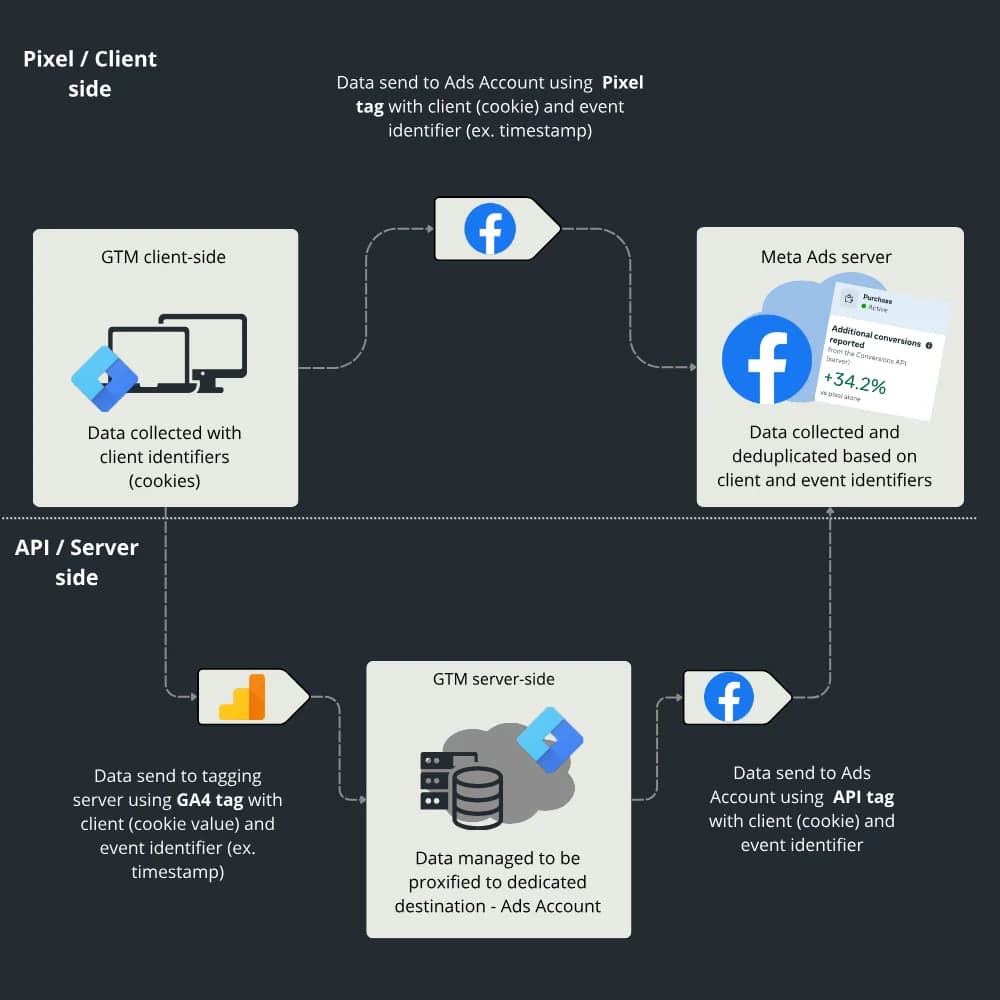
If you run Meta campaigns and don't want to burn through your budget, the Meta Conversions API is no longer a nice extra. It's a must. This guide shows you, step by step, how to implement CAPI on your own website. It's a complete walkthrough that comes with ready-made JSON files for GTM.
This is a story about how the right technology, properly configured, can help a business scale and prevent data loss as restrictions keep tightening. In this case study, Impest used server-side tracking to improve Google Analytics vs CRM data match by almost 30% and recover over 20% of conversions in Meta Ads.
The Data Layer is a JavaScript object (stored in an array) used to pass information from your website in a consistent, structured way.
Everything you need to know about Consent Mode v2 and a complete approach to cookie management, collected in one place as a straightforward guide.
September brought some genuinely interesting and useful features. On the Google side there are AI-generated summaries of published versions in GTM and improved hostname-based traffic filters in GA4, and Stape released a nice new solution: AI traffic detection.
We're back from the summer break with a triple dose of news: June, July and August together. Google mostly made more announcements than real changes in that time, but we've summed them up. Starting with this issue, the series gets a separate section on server-side and marketing APIs.
Google Marketing Live took place on May 20, and as usual Google showered agencies and clients with announcements. This time the focus is on Tag Manager: official confirmation of a refreshed interface and a fundamental change in its architecture.
The only new GA4 feature added since early February is the task assistant. You can think of it as an automated Google Analytics setup checklist.
Can you recover 100% of your traffic data and still fully comply with GDPR and the guidelines of regulators such as CNIL? Yes. The answer is Consent Exception Tracking (CET), a model that shifts the focus from "tracking people" to "measuring events". No cookies, no fingerprinting, and NO CONSENT required. This article is a practical guide to building your own independent analytics system that keeps working even when a user clicks "Reject all".
A practical guide to Microsoft Consent Mode, the mechanism that adjusts how Microsoft Advertising (Bing Ads) and Clarity tags behave based on the user's cookie choices.
A complete guide to the TikTok Events API and how to set it up yourself with server-side GTM.
February was fairly quiet. The main update is the expansion of automated insights in GA4. Apart from that, the Google tag can now send automatic events directly to Google Ads, and as usual Looker Studio got a few useful improvements
A few years ago, a standard analytics setup in a tool like Google Analytics captured roughly 85% of the actual data (comparing sales in the CRM with what the tool reported). Today, companies can face much bigger gaps in their reported results. There are various ways to narrow those gaps and send the missing data. In this article I focus on testing a solution from Piwik PRO that collects events without creating any user session or cookie.
On February 28, 2026, version 2.3 of the TCF standard developed by IAB Europe comes into force. If your site uses Google's advertising products (such as AdSense or Ad Manager) and you don't implement the update in time, Google will switch your site to limited ads by default.
January brought more announcements than actual updates. Most of the new features are either unavailable or in very early beta. GA4 is in a state of chaos because of new features that, in my view, only make the tool less trustworthy. GTM announced a simple Google Tag Gateway integration through GCP, and I'm honestly looking forward to it. Looker Studio got a few useful improvements.
This case study describes a project for Triumph B2B where, instead of a standard backend integration, we deployed an advanced custom script through Google Tag Manager. It works as a smart analytics layer on top of the site: it reads data precisely from the visual layer (the frontend) and from the application's internal state, and feeds key business metrics into the reports.
Our work on this project was recognized by Google: see the TVP case study published by Google. We are one of the few companies with a joint publication with Google on thinkwithgoogle.com. Google recognized our project for Telewizja Polska, where we implemented the entire Google Analytics 4 infrastructure and the use of BigQuery data in real time.
GA4 "models" and "guesses" more and more, so an independent verification system works as an insurance policy for your data. In some cases, such as affiliate campaigns built on discount codes, it can also fill in the customer journey.
November brought nothing even worth mentioning, but in December both Google Analytics and Google Tag Manager got features that could be very useful in 2026. First up is Analytics Advisor, a conversational AI agent built into GA4. GTM has its first change since August: some very handy built-in variables
Two Google Analytics updates caught my eye in October: new connectors for importing cost data from ad platforms (we have a dedicated blog article on them) and new metrics in competitive benchmarking. Google also expanded responsive dashboards in Looker Studio
Over the past few weeks, Google has released connectors for the ad platforms of popular social networks, including Meta Ads, TikTok Ads and Pinterest Ads. In this article you'll learn what analysis these connectors make possible in GA4, and we'll walk through setting them up step by step.
By now we're probably used to Google not spoiling us with updates, but here's what happened in September: new cost data imports in GA4 and new sorting options for Looker Studio tables.
After the summer break, we're back with our monthly roundups of what's new in web analytics across Google's tools. Here's a summary of what changed in July and August.
Not much happened in GA4 in June that deserves a longer comment. The GA4 roadmap is getting more and more disappointing. Still, here's a summary of the main updates.
May brought no updates to Google Analytics 4 itself, but there is an interesting change in how data gets collected: new ways to set up Google Tag Gateway, previously known as first-party mode. Looker Studio also has a new UI/UX, and it's a genuine improvement.
April brought another round of mostly cosmetic changes to Google Analytics 4 and GTM, and most of the new features are the kind few of us will ever use. There is one gem, though: new item-level filtering options. It's something everyone has probably been waiting for, and it's hard to understand why Google's engineers are only adding such a simple, fundamental feature now.
Piwik PRO is an advanced analytics platform. It grew out of Piwik (now Matomo), an open-source project started in 2007 as an alternative to Google Analytics. Piwik PRO and Matomo (formerly Piwik) share the same roots, but they differ in many ways, especially in features, intended use and user support.
Our monthly roundup of what's new in web analytics. In March, the things to watch are annotations in GA4 and the announcement that GTM will load the Google tag automatically.
We take a closer look at the cookie banner as a way to inform users about a site's cookie policy and at what the law expects it to look like. We also check how different banner versions affect consent rates.
February was another month in a row without many updates. As always, we've summed up everything that happened in this article.
Implementing Enhanced Conversions in Google Ads is an important part of campaign optimization. It lets you send additional user data, such as email addresses or phone numbers, to make conversion tracking more accurate.
January didn't bring many updates to Google's analytics tools. We've still rounded up the most important ones, and the highlight is a long-overdue feature: copying exploration configurations between properties. More details in the article, as usual.
Mapping a subdomain to your tagging server takes server-side tagging a step further. You get a first-party context, which means more secure and, above all, longer-lasting cookies. As a result, your data is more accurate and your ads target users more precisely, which should translate into lower ad spend. This article walks you through the setup step by step.
Google is bringing Gemini AI to Looker. For now, the AI feature is only available to Looker Studio Pro users. Still, it's an interesting move toward using AI directly in the tool, with no need for external solutions. Gemini will make it easier to create calculated fields by suggesting formulas based on your descriptions.
If you're wondering why your site converts poorly and always ranks behind your competitors, it's high time to check and compare your Core Web Vitals, the main performance metrics for websites. With the Chrome UX Report you can see how every metric looks for you and for your competitors, and this article shows you how to build the report in under 15 minutes.
Not much happened in web analytics in November, but a few features are worth mentioning, including Customer Match in Google Analytics, which helps you maximize your audience lists, and showing applied filters to people viewing Looker Studio reports.
Google Analytics 4 currently misattributes traffic and conversions from Display & Video 360 (DV360) and Campaign Manager 360 (CM360) when auto-tagging is enabled.
A roundup of the web analytics updates from October, including benchmarking in GA4, saving and sharing segments, and a new realtime report.
Can you report traffic sources correctly in BQ? Is the GA4 sessions metric reliable at all? Why is there so much (not set) in my data? This article answers all of these questions.
For Meta Ads, the Meta Conversions API is the answer to the limits of client-side tracking. In this article you'll learn what it is, how it works and why it's worth implementing, and we'll debunk a few myths about it along the way.
Black Week and the run-up to the holidays are a critical time for businesses that want to get the most out of their sales. Preparing your Google Ads campaigns well can make a big difference during this busy period. That's why we've put together a complete step-by-step checklist to help you optimize your Google Ads account and make the most of the sales season.
Trends shift fast and competition keeps growing, so for any business investing in online advertising a regular Google Ads account audit has become a necessity rather than a nice-to-have. This article collects everything you need to approach it professionally.
Here's what interesting releases came out over the summer in web analytics, including traffic sources finally available in BigQuery, improvements to GA4 reports and an Excel connector for Looker Studio.
If you use server-side tracking on Google Cloud Run, or are thinking about it, this article will help you avoid a few early pitfalls that are easy to fall into during setup.
UTM (Urchin Tracking Module) parameters are tags you add to a link to measure how well your activity on external sources that send traffic to your site performs. They tell Google Analytics where a user came from. With a proper Google Analytics implementation, you can also judge the quality of that traffic.
A Google Analytics 4 (GA4) audit is what lets a company use the tool effectively and trust its data. After a careful audit, you can rely on that data across your organization with full confidence and turn it into higher revenue.
In this article you'll learn how to archive your Universal Analytics data yourself, without a 360 license.
Clever Analytics lets you recover data hidden by ad blockers and privacy-focused browsers (such as Firefox and Brave), which GA4 usually misses.
Learn how server-side tagging affects your Google Analytics 4 data compared with traditional client-side tagging.
How do you find out which on-site actions actually work? This article shows how to approach it end to end, from implementation to data analysis.
Google Consent Mode lets GA4 and Google Ads scripts run even when users don't consent to data collection. In that case no cookies are stored, but cookieless pings are still sent to Google Analytics.
This guide shows you how to set up server-side tracking with a server-side GTM container, from start to finish.
In this article we look at how to use Google Consent Mode (GCM) data in BigQuery. You'll learn what data is available in BigQuery for sessions where analytics_storage consent was denied, and how to approach working with it.
Google signals lets GA4 merge several different cookies into one user (e.g. when one person uses several devices or browsers). It does this using our sign-ins to Google services and Google partners' services. It requires user consent, which people can grant or refuse, among other places, when creating a Google account.
The latest news from the world of Google analytics tools: September 2023
In this article you'll learn what the Google tag is, whether you need it, what you can use it for and how to set it up yourself
The latest news from the Google analytics tools: July 2023
This article shows how to set up the main tags in Google Tag Manager for an enhanced ecommerce implementation in Google Analytics 4. It's especially useful if your store runs on WordPress.
The latest news from the world of Google analytics: May 2023
The latest news from the world of Google analytics: April 2023
The latest news from the world of Google analytics: March 2023
Google Analytics 4 launched in 2020. It was first called "App + Web" before getting its final name, GA4. Its core idea, and the main difference from its predecessor, is a single data structure for both websites and mobile apps.
I tested a plugin that automatically builds a dataLayer for an Enhanced Ecommerce implementation in Google Analytics. If your store already pushes Data Layer events, you can skip the first sections and go straight to setting up the tags in Google Tag Manager.
Installing Google Analytics on a website sounds scary if you've never done it, but it's a fairly quick and simple job, especially if your site runs on WordPress, where plugins make the Google Analytics installation trivial.