In 2022, online advertising spend in Poland reached PLN 6.853 billion, 9.9% more than the year before, and it's forecast to grow again in 2023.
Adam Brzostek
Reading time: 4:00
Find out what actually works on your website
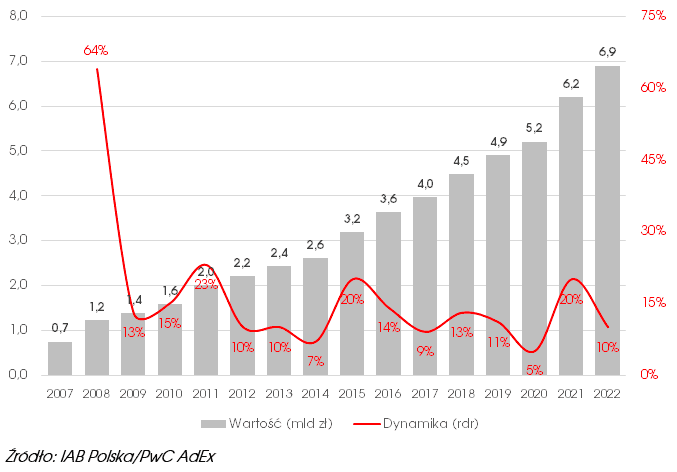
There's no doubt that we spend, and will keep spending, money to get noticed online. But running an e-commerce business also means huge spending on the platform itself and all its components, such as banners, pop-ups, exit intent, social proof, dynamic recommendations and all kinds of marketing automation campaigns. All of them have one goal: getting the user to convert.
E-commerce reporting focuses mainly on how our media perform. Working with many companies, though, I've noticed that very few continuously monitor how well the actions aimed at users they've already acquired actually work.
As a result, we miss information about what on our site actually works the way we intended. You could say we act blindly, and we often don't know that an action, instead of helping, turns out to be a distraction that hurts conversions.
With a full picture of what works on the site and what doesn't, you can manage the budget for its development better, and maybe even cut some of your media spend.
Unified measurement of all actions
Google Analytics 4 does offer the internal promotion measurement methods known from Universal Analytics, but to put it mildly, Google didn't put much effort into them, and performance reporting is practically nonexistent.
The key is to measure every action that counts as internal marketing in the same way. You need two events from the Google Analytics 4 list of recommended events:
- view_promotion - an impression of the measured action, ideally fired when the user actually sees the element
- select_promotion - a click on the measured action
This is how you should measure everything, from banners to email campaigns sent through marketing automation.
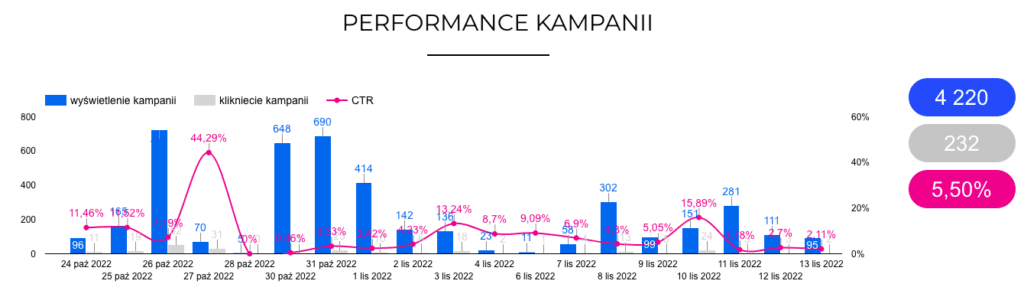
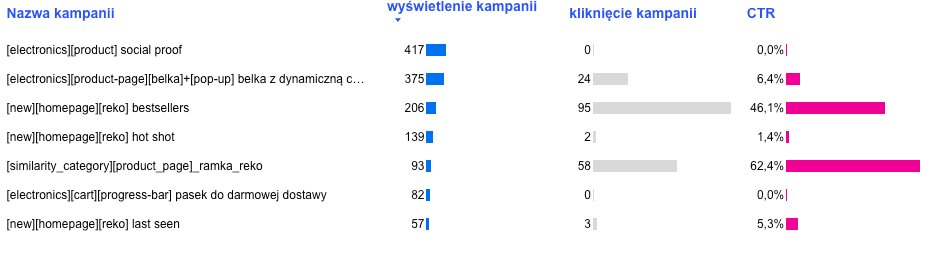
These two events alone let you calculate CTR and see which actions users are interested in
Attributing conversions to a specific action
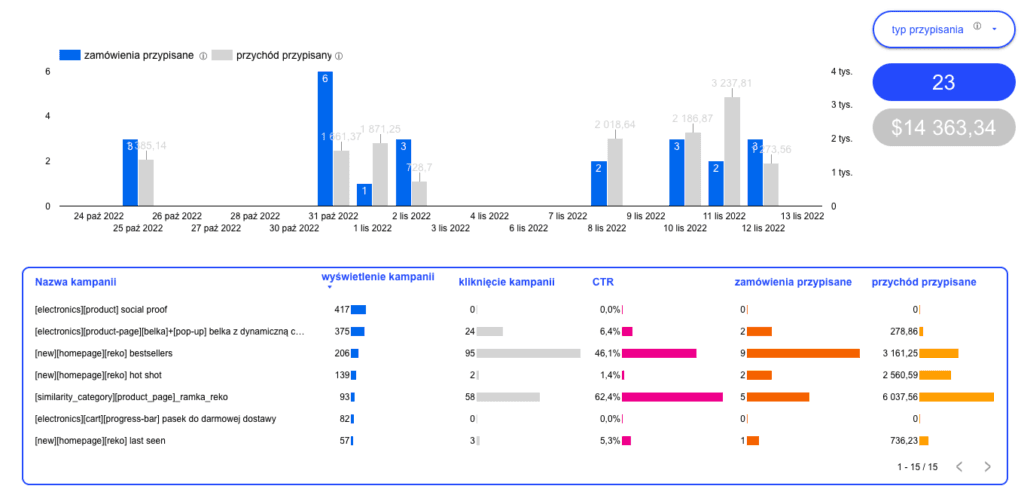
Apart from measuring interactions with your internal marketing actions, make sure every conversion you've defined on the site is measured too. Then you can connect conversions and revenue to a specific internal marketing action. The best way to do this is with raw Google Analytics data in BigQuery, where you build your own attribution model and set the matching criteria yourself. That way you learn not only which action gets the most interest from users, but also which one drives the most conversions.
Assisted conversions vs. attributed conversions
As mentioned, when you build your own attribution model, you decide how conversions are linked to a given internal action. At Bettersteps, we approach this in two ways.
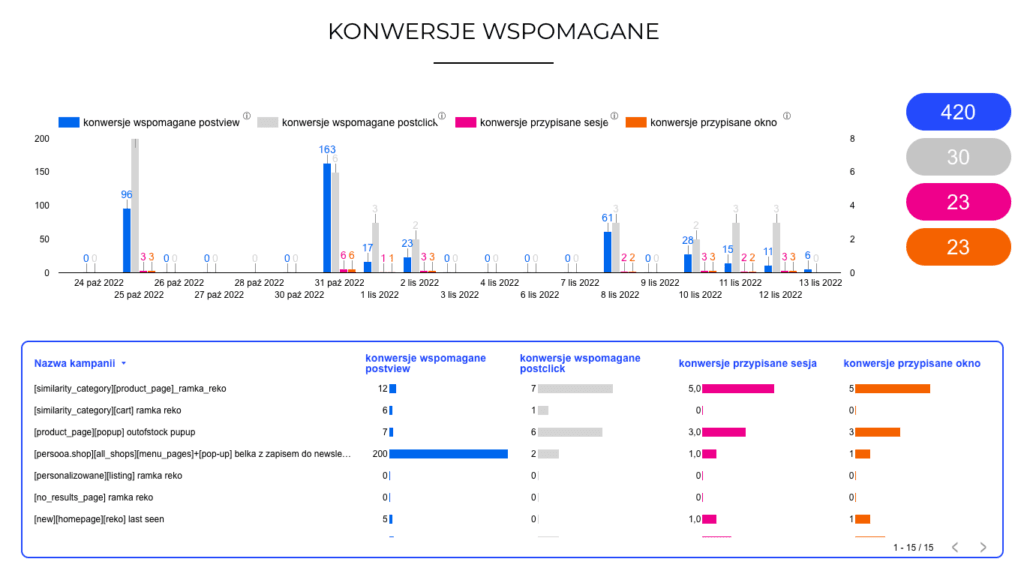
Attributed conversions
Attributed conversions are those we assign using the last click criterion (or last view if there was no click, although you can drop that option). In other words, we attribute a conversion to the last internal action that was clicked right before the conversion. You define the interaction lookback window yourself: it can be the session, or, if you want to see how campaigns perform over a longer period, for example 7 days. This method tells you which campaign had a direct impact on conversions.
Assisted conversions
We know very well that users may interact with many campaigns before they convert, so we defined a conversion type called assisted conversions. Each conversion is attributed to every campaign the user came across on their path. This gives you a broader view of each campaign, so you don't accidentally drop one that brings few attributed conversions but turns out to be an important part of the user journey when you look at assisted conversions
This approach gives you a clearer picture of what works for you and what isn't worth developing
Control group
The last thing we haven't covered is identifying distractors: campaigns that lower the conversion rate instead of helping.
The best way to check this is to run a kind of A/B test where version B is the control group. In the control group, a certain percentage of users don't see the campaign, but a flagged data layer event still fires and the measurement runs as if they had seen it. This shows you whether the displayed content actually improves the conversion rate.
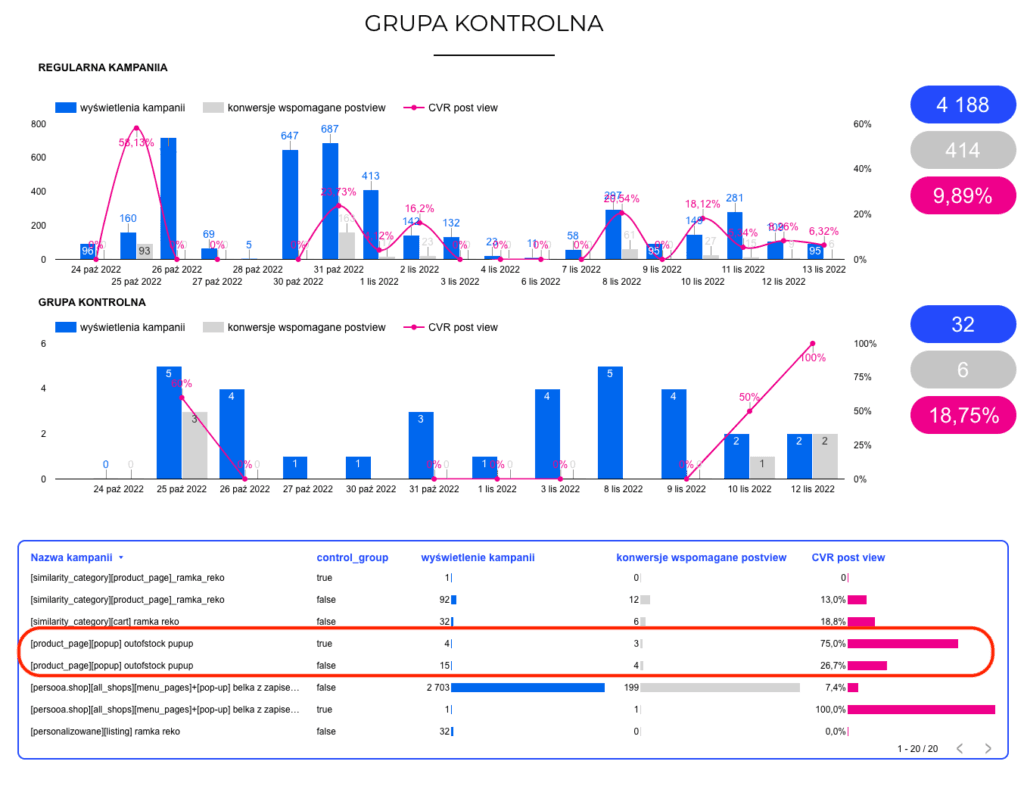
In the example above, the group of users who didn't see the pop-up ended up with a higher conversion rate, so it's worth dropping the pop-up.
If you'd like to start measuring what actually works on your website but don't know how to implement it, get in touch. We'll handle the whole process end to end: we'll implement our Data Layer framework for measuring these interactions and build an attribution model tailored to your business and your needs.