Adam Brzostek
Reading time: 5:00
How to use Google Consent Mode data in BigQuery
Our previous articles explained what Google Consent Mode is and how it affects the data available in Google Analytics 4. In this article we look at how to use GCM data in BigQuery. You'll learn:
- What data is available in BigQuery for sessions where analytics_storage consent was denied?
- How does denied consent affect user_id collection?
- How do you estimate the number of sessions and users for sessions where analytics_storage consent was denied?
What data is available with Google Consent Mode?
We already know that with a correctly implemented Google Consent Mode, Google Analytics tags fire even when consent hasn't been granted. In that case they run in a special mode and send limited information to Google Analytics servers. To be precise, this mode sends cookieless pings, so no event data is tied to a persistent user identifier.
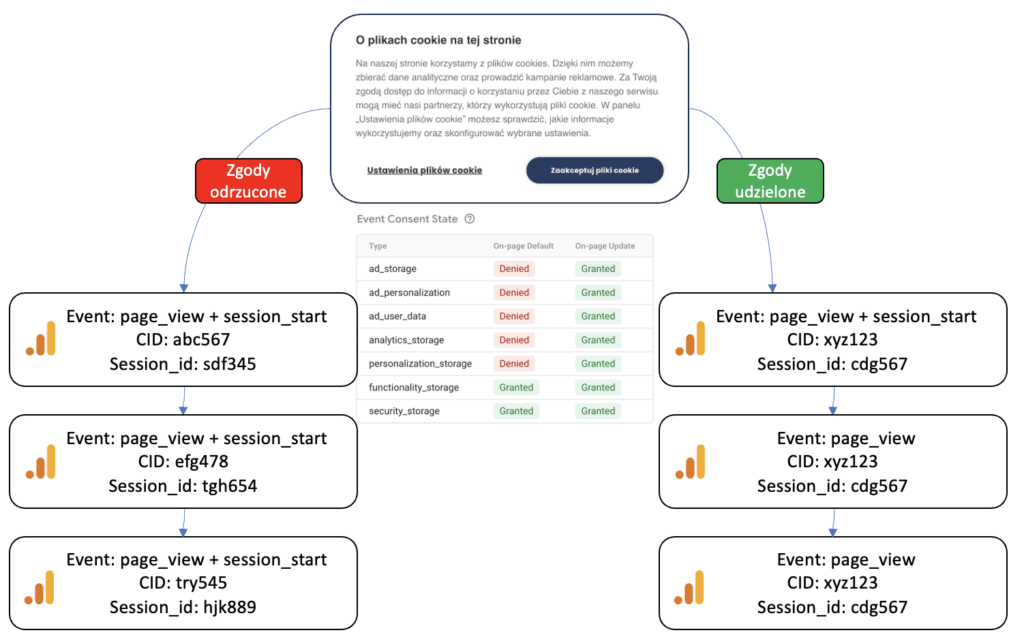
Without analytics_storage consent, cookies can't be stored on the client side. As a result, every pageview creates a new client_id and sends a session_start event, which creates a ga_session_id based on the timestamp. Even so, for pings without consent neither identifier reaches GA or is used in calculations, since that would badly distort the real picture of traffic in terms of session and user counts.
This means that for users who didn't grant consent, GA gives us actual measurements of event counts (except for session_start and first_visit), while sessions and users are available as data from behavioral modeling. You'll find more on this in this article: https://bettersteps.pl/en/blog/ga4-with-vs-without-google-consent-mode
What Google Consent Mode data is available in BigQuery?
The main difference in the BigQuery export for data from sessions where analytics_storage consent was denied is that there's no behavioral modeling data. Because of that, we can't count users and sessions the standard way, as we're missing two essential dimensions: user_pseudo_id and ga_session_id.
We also need to remember that the number of session_start and first_visit events is artificially inflated, because they're sent on every pageview. The other events are available as usual, and we can use them without any adjustments.
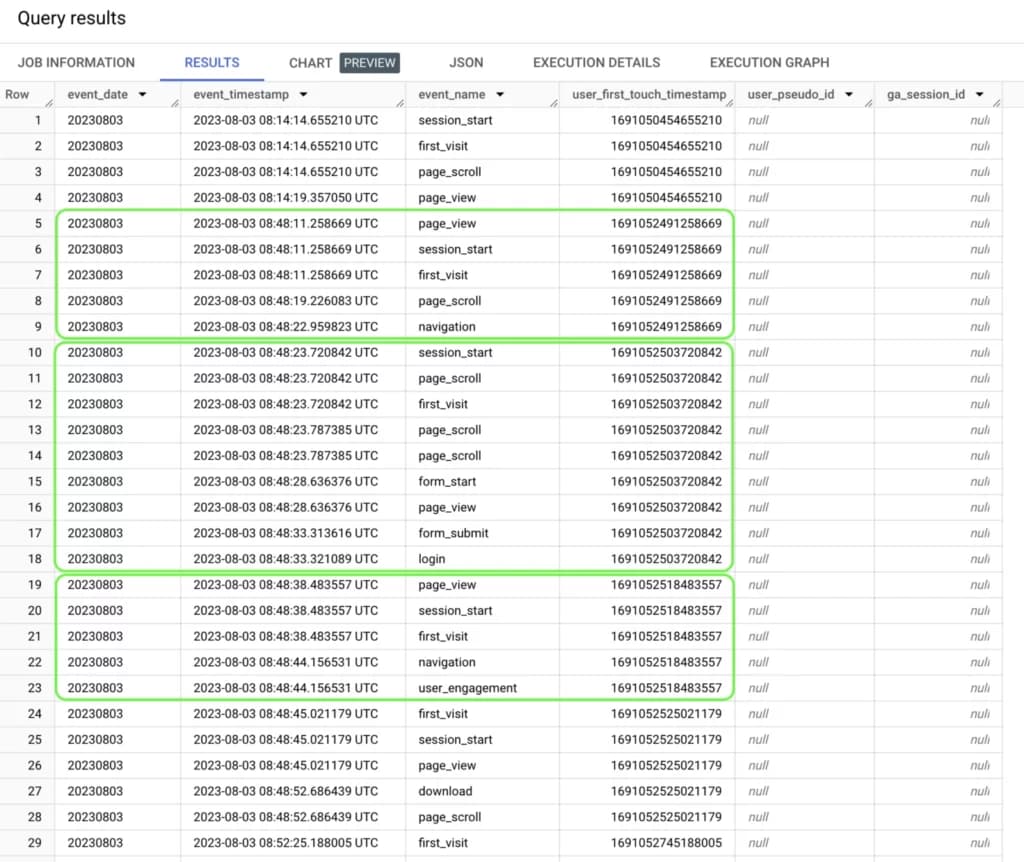
In the example above you can see that the user_pseudo_id and ga_session_id dimensions return null in a BigQuery query.
Another thing you can see is repeated session_start and first_visit events for the same user within the same session. How do we know this sample data comes from a single user? I explain that in the next part of the article.
How to calculate sessions and users yourself
The standard way to calculate users was to count distinct user_pseduo_id values.
0
1
2
3
SELECT
COUNT (DISTINCT user_pseudo_id)
FROM `bettersteps.analytics_166108814.events_*`
To calculate sessions, on the other hand, we had to count distinct concatenations of user_pseudo_id and the ga_session_id parameter
0
1
2
3
4
5
SELECT
COUNT (DISTINCT (concat (user_pseudo_id,
(select value.int_value from unnest(event_params)
where key = "ga_session_id"))))
FROM `bettersteps.analytics_166108814.events_*`
Without these dimensions, we can't use either of these methods.
User ID
The documentation says that user_id is available as a dimension in data from sessions where analytics_storage consent was denied. The same is true in BigQuery. If your site has a login feature and you've implemented user_id, you can use it to calculate the number of users.
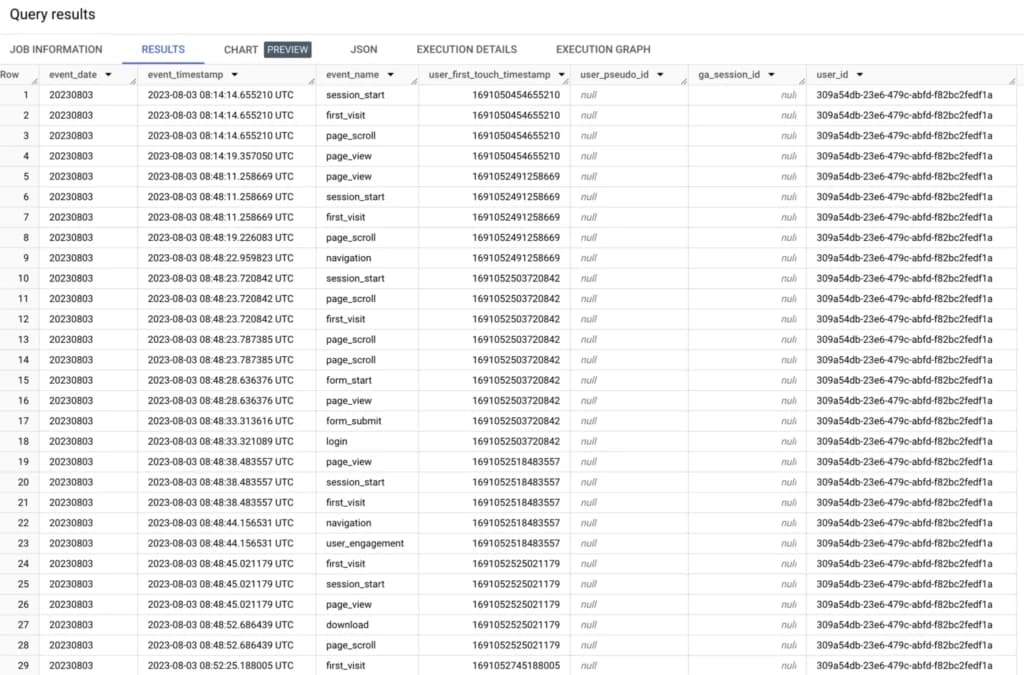
This data will be more accurate, because it shows the actual number of users, so if you already report users based on user_id, nothing changes. Calculating the number of sessions is a bit more complicated.
Let's assume that a new session starts after a 30-minute gap between consecutive events. Of course, this time depends on your GA4 property settings.
To set this flag, we'll use the timestamp_diff and lag functions.
0
1
2
3
4
5
6
7
8
9
10
11
12
13
14
15
16
SELECT
event_date,
TIMESTAMP_MICROS( event_timestamp)
as event_timestamp,
event_name,
user_first_touch_timestamp,
user_pseudo_id,
(select value.int_value from unnest(event_params)
where key = 'ga_session_id') as ga_session_id,
TIMESTAMP_DIFF( TIMESTAMP_MICROS( event_timestamp),
LAG(TIMESTAMP_MICROS( event_timestamp))
over (partition by user_id
order by event_timestamp), minute) as timestamp_diff,
user_id
FROM `bettersteps.analytics_166108814.events_*`
order by event_timestamp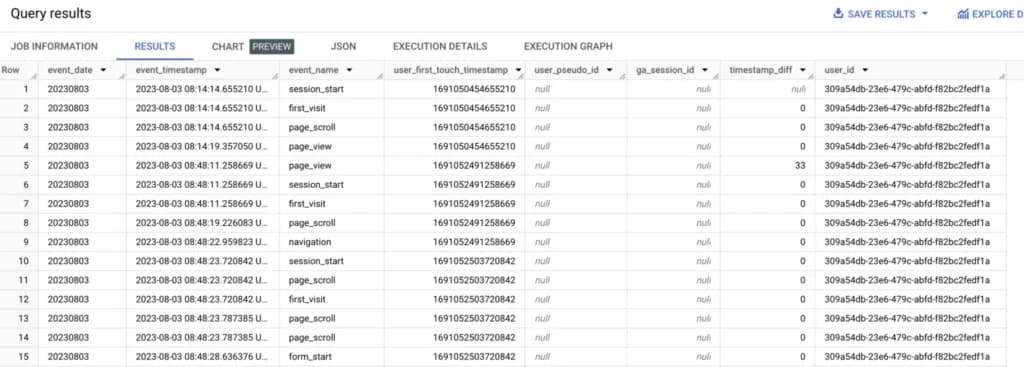
I'm interested in minute values, so I set minute as the parameter of the timestamp_diff function.
The next step is identifying when a new session starts. We'll use a simple case conditional expression for that.
0
1
2
3
4
5
6
7
8
9
10
11
12
13
14
15
16
17
18
19
20
21
22
23
24
25
26
27
with gcm as
(
SELECT
event_date,
TIMESTAMP_MICROS( event_timestamp)
as event_timestamp,
event_name,
user_first_touch_timestamp,
user_pseudo_id,
(select value.int_value from unnest(event_params)
where key = 'ga_session_id') as ga_session_id,
TIMESTAMP_DIFF(TIMESTAMP_MICROS(event_timestamp),
LAG(TIMESTAMP_MICROS( event_timestamp))
over (partition by user_id
order by event_timestamp),
minute) as timestamp_diff,
user_id
FROM `bettersteps.analytics_166108814.events_*`
order by event_timestamp
)

SELECT
*,
(case
when timestamp_diff > 30 then "new_session"
end) as session_info
from gcm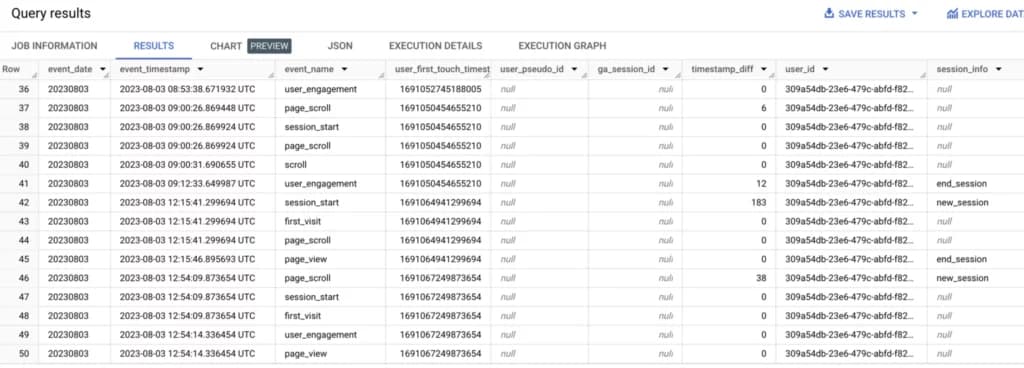
Now that I know when my session starts, I can assign it a synthetic ID.
To do that, I'll group events from one session using the countif function and assign user_first_touch_timestamp as the session ID using the min function.
0
1
2
3
4
5
6
7
8
9
10
11
12
13
14
15
16
17
18
19
20
21
22
23
24
25
26
27
28
29
30
31
32
33
34
35
36
37
38
39
40
41
42
43
44
45
with gcm as
(
SELECT
event_date,
TIMESTAMP_MICROS( event_timestamp) as event_timestamp,
event_name,
user_first_touch_timestamp,
user_pseudo_id,
(select value.int_value from unnest(event_params)
where key = 'ga_session_id') as ga_session_id,
TIMESTAMP_DIFF( TIMESTAMP_MICROS( event_timestamp),
LAG(TIMESTAMP_MICROS( event_timestamp))
over (partition by user_id order
by event_timestamp), minute)
as timestamp_diff,
user_id
FROM `bettersteps.analytics_166108814.events_*`
order by event_timestamp
),

gcm_v2 as
(
SELECT
*,
(case
when timestamp_diff > 30 then "new_session"
end) as session_info
from gcm
),

gcm_v3 as
(
SELECT
*,
countif(session_info in ("new_session"))
over (order by event_timestamp) as session_group
from gcm_v2
)

SELECT
*,
min(user_first_touch_timestamp)
over (partition by session_group) as session_id
from gcm_v3
order by event_timestamp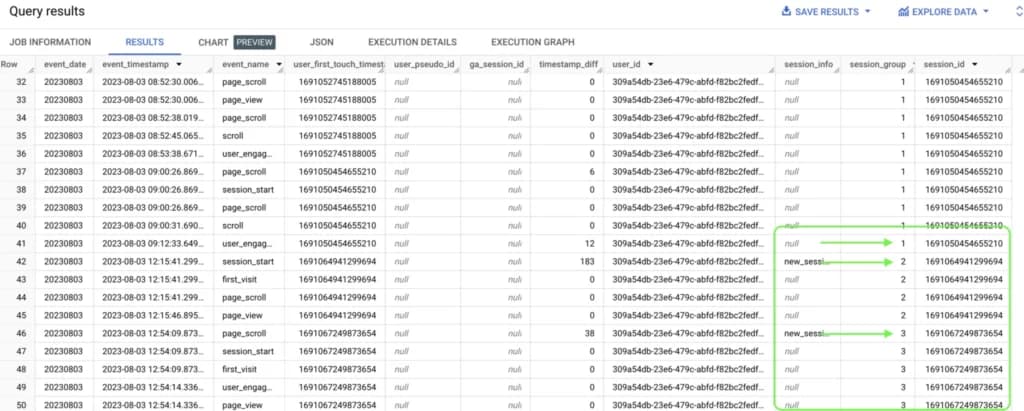
With these operations I've modeled a session ID that I can now use in calculations.
0
1
2
3
4
5
6
7
SELECT
COUNT (DISTINCT user_id)
FROM `bettersteps.analytics_166108814.events_*`

SELECT
COUNT (DISTINCT (concat (user_id, session_id)))
FROM `bettersteps.analytics_166108814.events_*`
Unfortunately, I can only apply these calculations to users who have a user_id assigned.
Custom dimensions
To work in BigQuery with data from users without a user_id as well, we can use custom dimensions, which are also sent to Google Analytics for sessions without analytics_storage consent.
For legal reasons, we shouldn't set any identifiers on the user's side that would allow them to be recognized, so without a user ID we have to give up the users metric in BigQuery.
We can, however, create a dimension that replaces the session ID and lets us link events from the same session.
As our custom session_id we'll use the session start timestamp. To do that, we need to create a Custom HTML tag in GTM that saves the current timestamp to session storage:
0
1
2
3
4
5
<script>
  var session_start = Date.now();
  sessionStorage.setItem('session_start',
  session_start);
</script>
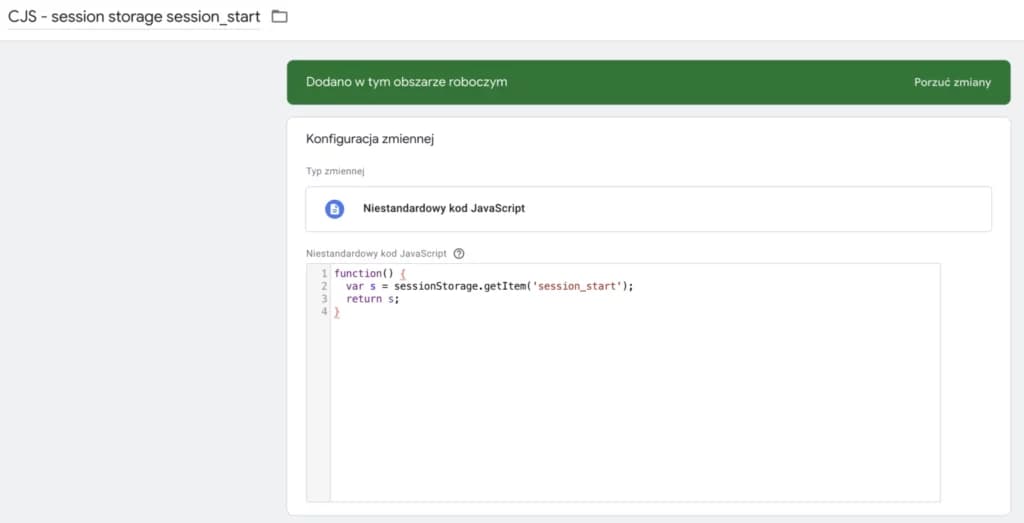
Since we want this tag to fire only once per session, we need a variable that reads the session_start value from session storage. For that, we'll create a Custom JavaScript variable:
0
1
2
3
4
function() {
  var s = sessionStorage.getItem('session_start');
  return s;
}
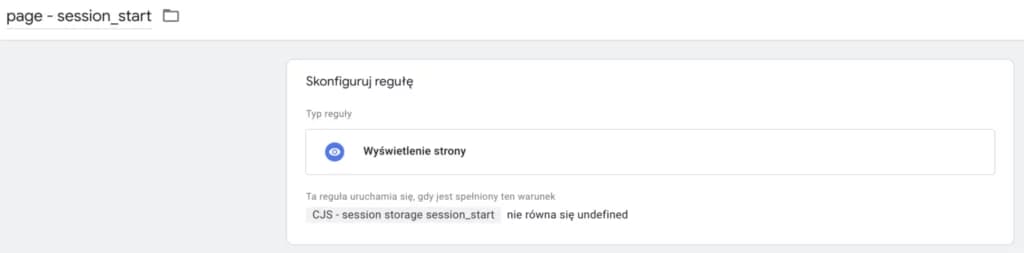
We'll configure the trigger for our tag so that it fires only when the parameter doesn't exist in session storage yet:
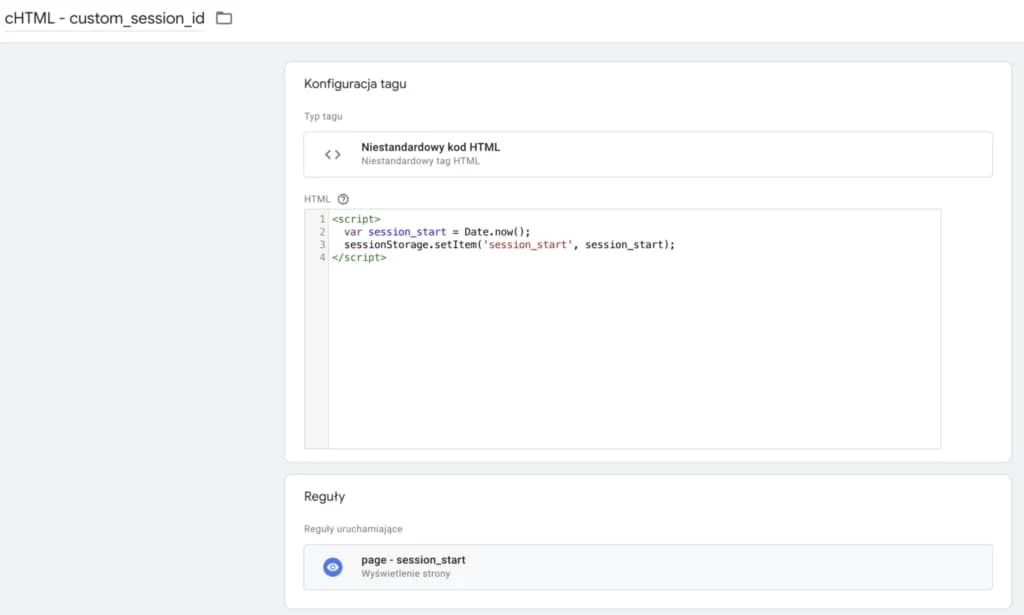
The last step in GTM is adding this variable to the configuration of our GA4 tag:
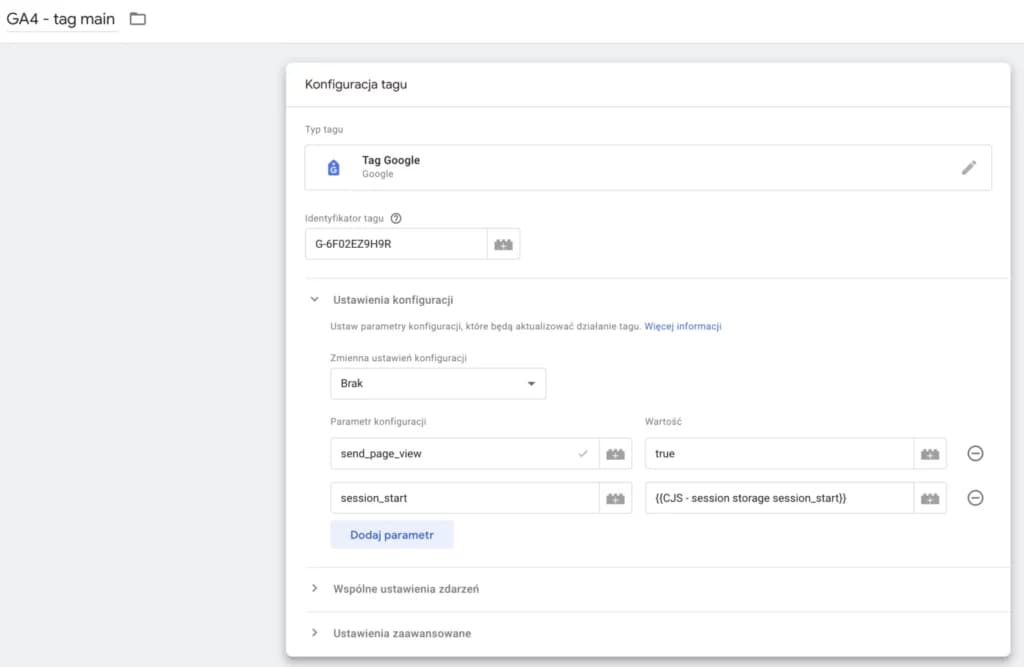
Of course, if you use a configuration settings variable, you can add it there instead.
Since we only need this parameter for calculations in BigQuery, we don't have to set it up in the Google Analytics 4 interface.
One important caveat: the same session_start value may in fact occur in more than one session, but this is a simplification we accept for reporting purposes.
With this parameter we can link events from one session with a high degree of probability and use it to calculate the number of sessions in BigQuery for sessions without analytics_storage consent.
0
1
2
3
4
5
SELECT
COUNT (DISTINCT (select value.int_value
from unnest(event_params)
where key = "session_start"))
FROM `bettersteps.analytics_166108814.events_*`
Conclusions
Although BigQuery data for sessions without analytics_storage consent is heavily limited, we can still report on it and analyze it. It's a bit more complicated, and for logged-out users it requires additional tagging. It's still worth doing, though, because you get more accurate data that shows the real picture of traffic on your site and lets you draw more precise conclusions.
Sources:
How tags behave based on consent state: https://support.google.com/analytics/answer/9976101?hl=pl&sjid=1091137706529052351-EU
Behavioral modeling: https://support.google.com/analytics/answer/11161109