On February 28, 2026, version 2.3 of the TCF standard developed by IAB Europe comes into force. If your site uses Google's advertising products (such as AdSense or Ad Manager) and you don't implement the update in time, Google will switch your site to limited ads by default.
Rafał Piszczatowski
Reading time: 6:00
Cookie banner changes from February 28: TCF 2.3
What is TCF?
TCF is an industry standard for passing on user consent information. IAB Europe created it to standardize how websites tell their advertising partners what a visitor has allowed (or refused).
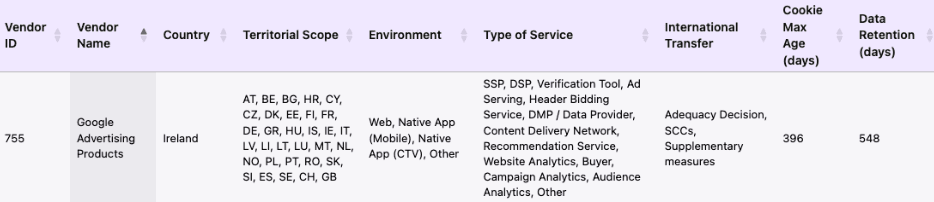
How does it work in practice? When a user visits your site and clicks accept on the cookie banner, the banner should generate a string of characters called the TC String. It contains encoded information about which purposes the user consented to and for which partners (vendors). TCF relies on a public list of thousands of companies (Google, RTB House, Facebook etc.), each with its own unique ID.
Example: Google's Vendor ID:
TCF 2.3: what changes on February 28, 2026?
Version 2.3 was created to fix a situation where vendors didn't know whether they had been shown to the user and accepted in the cookie banner. The IAB Europe article (https://iabeurope.eu/all-you-need-to-know-about-the-transition-to-tcf-v2-3/) confirms that the system must send proof that the vendors were disclosed to the user. Under this policy, we should show the number of vendors on the first layer of the cookie banner and pass this information in the consent strings according to the TCF rules. Technically, TCF 2.3 requires a “disclosedVendors” segment in the consent string, which tells ad systems which companies the user had a chance to see before accepting. Before TCF 2.3, the banner could report only the consent itself. Now it also sends a list of IDs of all companies listed in the banner settings at the moment consent was requested.
Who does the update affect?
- - if you're a publisher and show Google AdSense, Ad Manager or AdMob ads on your blog or portal, the answer is clear. According to Google's official guidelines, from February 28, without a valid TCF 2.3 signal Google will start serving Limited Ads on your site.
- - if you're an advertiser using Google Ads, I'd encourage you to check from March onward whether anything worrying is happening to the remarketing lists pulled into Google Ads. I haven't found any clear articles saying advertisers will be affected too, but it's worth checking that nothing problematic is going on in your Google Analytics/Google Ads accounts.
| Site type | Do you need to implement TCF 2.3? | Additional information |
|---|---|---|
| Publisher (Ad Manager, AdSense) | Yes | Without it, Google will block ad personalization. |
| Website/app that runs ads, e.g. Google Ads | Recommended | Worth implementing so you send data to Google Ads in line with the TCF standard (Google Ads has been reading the TCF standard since 2020). |
| Website/app without Google Ads (only Google Analytics running) | No | A correct Consent Mode v2 setup is enough. |
| Website/app with no tracking and no ads | No | - |
What should you do?
- Check the certification status: You can check whether the solution you use is a Google-recommended one here: https://cmppartnerprogram.withgoogle.com/#partners. If it is, the tool will probably be ready for the change. Unfortunately, in some tools displaying vendors and sending the right data only works on the highest subscription plans. The cheapest paid plans, e.g. from Cookie Script or CookieHub, don't let you turn this feature on.
- Update the script version: If you use an off-the-shelf CMP, check whether you can enable TCF 2.3 (or 2.2, which the CMP will automatically update to 2.3 after February 28).
- Check the visual layer: Does the first view of your banner show the total number of partners (e.g. "We work with 10 vendors")?
- Audit the vendor list: Go through the vendor list in your CMP dashboard. Remove the ones you don't use.
- Test the TC String: Use a tool such as IAB TCF Debugger to check whether your string contains the disclosedVendors segment after consent is given.
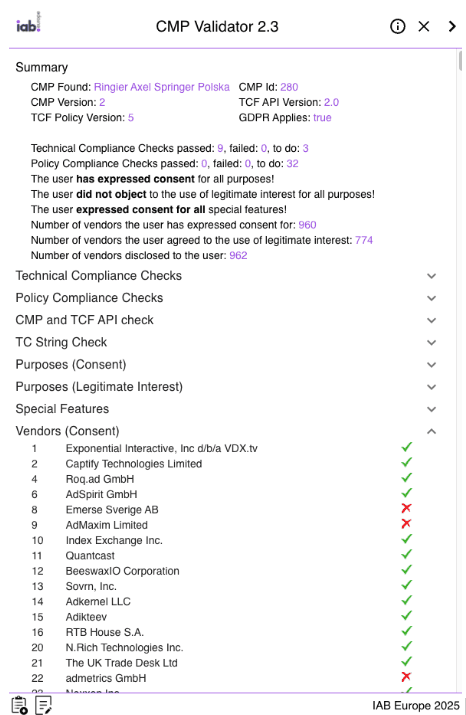
- Check Google Ad Manager / AdSense: After February 28, keep an eye on the "Diagnostics" or "Privacy & messaging" section.
What if I have my own cookie banner?
With a custom CMP, things are unfortunately harder. You'll need additional development work to support version 2.3 of the https://iabtcf.com/api/core/index.html library.
Cookie banner examples
Some major sites on the Polish market and the largest publishers have been using the standard for a while. If you visit the most popular portals, you can see these solutions in action. The first layer of the cookie banner shows the number of partners the site works with.
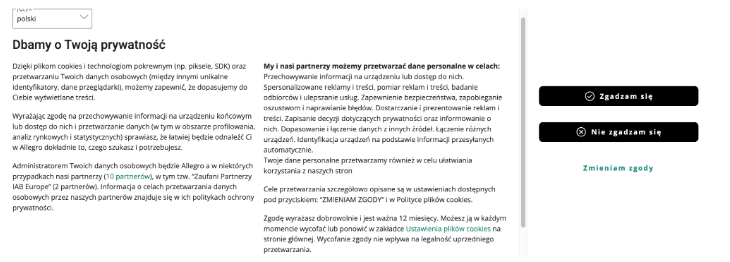
The cookie banner in the screenshot above comes from allegro.pl, which lists 10 partners, including 2 IAB partners. This means 8 partners are companies that probably aren't on the IAB list and aren't covered by the TC String. These 8 companies are service providers with a narrower scope that don't need to take part in the wider data exchange. This category often includes chatbots, smaller affiliate programs, analytics and UX tools, and personalization tools that work on-site with first-party data.
Summary
TCF 2.3 is another sign that the days of broad, imprecise cookie banner consent are coming to an end. Market standards are getting stricter, and Google is less and less forgiving of technical gaps in how privacy signals are sent. From a business perspective, what's at stake is no longer only legal compliance but, above all, the stability of your ad revenue and the accuracy of your analytics.
The privacy ecosystem has been changing very fast in recent years. With constant updates to the standards (TCF 2.2, Consent Mode v2, now TCF 2.3), maintaining in-house custom solutions is no longer cost-effective for many companies. Every spec change means pulling in the development team, which is expensive and risks technical errors. In many cases it's much more cost-effective and safer to move to an off-the-shelf, certified CMP platform that takes care of the updates for you. The final choice between building and buying always depends on the project's specific needs and the organization's technical resources, though, and should follow an individual analysis.
If you have doubts about your current solution or want to talk about how best to prepare your site for the upcoming changes, get in touch. Fill out the form below and our experts will help you choose the right solution for your business.