In an ideal world, every analytics implementation starts with precise Data Layer documentation that the development team implements directly in the application code. That's the ideal approach and the most stable one. But what if your company is a global giant like Triumph, and the IT team's system priorities are currently elsewhere than a Data Layer implementation?
Rafał Piszczatowski
Reading time: 5:00
Case study: building a Data Layer and analytics for the Triumph B2B platform
That's the challenge the Triumph B2B team faced. They needed accurate data on sales and business partner behavior in GA4 "yesterday", but access to IT resources was temporarily blocked by critical system migrations.
The challenge
Triumph, a global leader in lingerie, runs extensive B2B sales across many international markets. Our job was to implement advanced analytics with Google Analytics 4 (GA4) to monitor sales performance, conversions and business partner behavior. Without advanced e-commerce tracking, key questions went unanswered:
- Which colors and sizes attract the most interest?
- Which product lines convert best in specific regions?
- At what point in the cart do B2B partners abandon their orders?
Our task was to implement full GA4 e-commerce tracking without touching the platform's source code and without involving the overloaded IT team.
What we did
Instead of waiting, we decided to use Google Tag Manager as a platform for injecting a smart analytics layer, on top of its usual job of firing tags. Our approach was based on getting as much information as possible directly from the data available in the application and partly using data from the frontend. Our custom solution was a JavaScript application that became the bridge between the application state and the data layer.
Deep integration with the application logic Most simple implementations scrape data from the frontend. That's a mistake: a layout or CSS change is enough to break the data. Our script works differently and hooks into the application's data store. So when a user adds a product to the cart, we don't read the button label or pull data from the frontend; we read clean data straight from the application's memory.
Asynchronous data enrichment The frontend often doesn't display all the data GA4 requires (e.g. collection or season ID). We gave our script additional functions for this. If information is missing from the view, the script sends a background request to the store's API, invisibly to the user, fetches the missing details and only then sends the complete data to Google Analytics.
Automatic data "cleaner" B2B means multiple currencies and price formats. We implemented a module that parses strings on the fly, replaces commas with periods and standardizes the data, which eliminates errors in financial reports.
GTM as the command center Using GTM, we built a system of virtual events. Every interaction, from viewing a list (view_item_list) to the final purchase (purchase), is processed by our script and passed to GTM, which translates it into the GA4 standard. This gave us full control over the data without having to release new versions of the whole site.
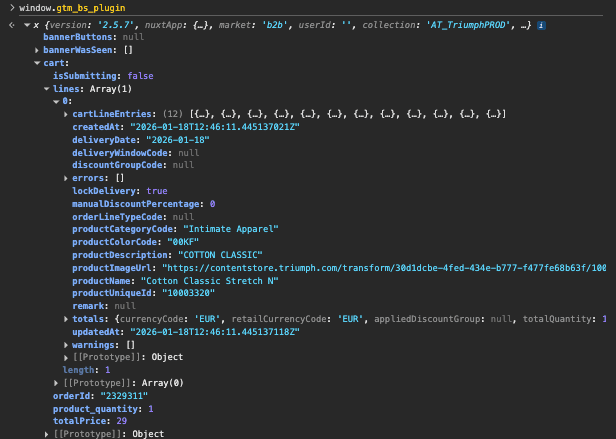
As specialists, we always stress that the best route is a Data Layer implemented by IT. It gives the lowest latency and the highest resilience to changes in the frontend code. In business, though, time to market matters. Our solution let Triumph B2B collect data during a period when no other solution was possible. That's months of data that would otherwise have been lost for good.
Results
The Triumph B2B implementation proved that technology in the hands of analysts can break a business deadlock. The project delivered measurable benefits in three areas.
- Shorter implementation time. The layer we implemented through GTM let us shorten the implementation time. The business had access to data within a few weeks of starting development work.
- Data quality. Even though we skipped the backend layer, we didn't compromise on quality. Asynchronous API requests and listening to the application state (Pinia/Vuex) gave results that traditional tracking can't. By validating data before sending it to GA4, we eliminated errors caused by incorrect currency parsing and duplicate transactions (a common problem when the order confirmation page is refreshed).
- International visibility The solution covers multiple markets and currencies within a single, well-organized GA4 structure.
Summary
- 0 hours of backend developer time to implement the e-commerce events.
- 100% visibility of the purchase funnel, from product view to the final transaction.
- 16+ additional parameters sent with every product, allowing detailed analysis of the product range and individual countries in GA4.
Your IT team has no time? We have a solution. The Triumph project showed that technological limitations are often just a matter of not having the right tool. With advanced use of GTM and custom JS scripts, we can deliver analytics on par with standard implementations that involve the IT team. Would you like to check whether we can implement an advanced Data Layer for you too, without involving developers? I'll be happy to review your site and suggest how to get analytics working in your business.