Black Week and the run-up to the holidays are a critical time for businesses that want to get the most out of their sales. Preparing your Google Ads campaigns well can make a big difference during this busy period. That's why we've put together a complete step-by-step checklist to help you optimize your Google Ads account and make the most of the sales season.
Konstantine Yevlakov
Reading time: 5:00
How to prepare your Google Ads account for Black Week and the 2024 holiday sales
You'll find each point explained in detail in our Google Ads Audit Guide
Here's what you should do, step by step.
1.Review and analyze your past tests
- Analyze the results of campaign tests from previous periods (especially Black Week and the holidays).
- Identify the most effective changes to your ad account structure and optimize your current campaigns based on what has already proven to work.
- Apply best practices, such as the campaign types, budgets or bidding strategies that delivered results.
2.Check that your conversion actions work correctly
- Make sure all conversion actions are set up correctly and collect data without errors.
- Check that all micro-conversions (e.g. add to cart, newsletter sign-up) are tracked correctly.
- Make sure Enhanced Conversions are turned on and working. They improve tracking and attribution.
3.Assess your Google Ads account structure
- Check whether your campaign structure is clear and logical (e.g. segmented by product, audience or purchase intent).
- Make sure your Search campaigns are optimized: ads should match user intent and keywords should be well chosen.
- Check the Quality Score of your ads and keywords. A high Quality Score is essential for lower cost per click and better ad positions.
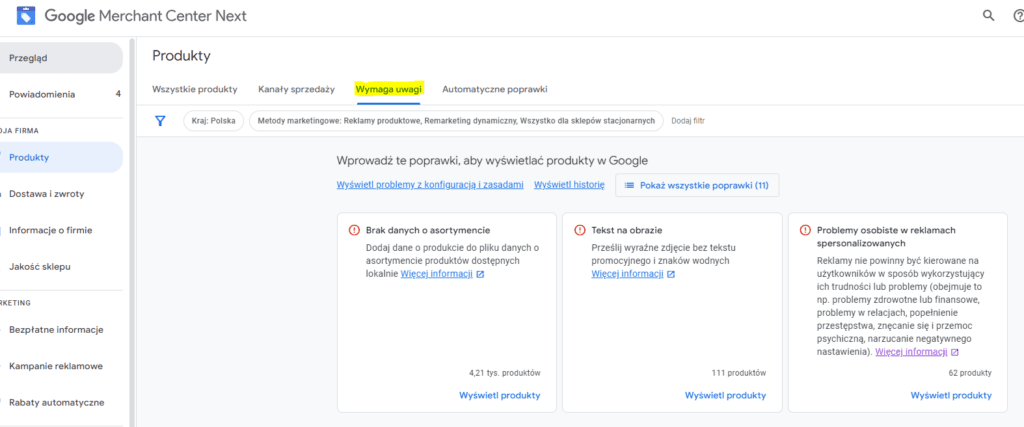
4.Optimize your product feed and Google Merchant Center
- If you run an online store, check that your product feed works correctly and contains up-to-date data, descriptions, prices and product availability.
- Make sure you're using everything Google Merchant Center has to offer:
- Update your shipping information,
- Complete your business information,
- Use supplemental data sources (e.g. dynamic remarketing feeds).
- Use attribute rules to better tailor your product listings.
5.Review negative keywords and exclusions
- Review your negative keyword lists at the account level and in each campaign to make sure you're not wasting budget on irrelevant search terms.
- Check your URL exclusions to make sure you're not sending ads to pages that don't fit the campaign goals.
- Review your excluded topics and placements so your ads don't show on sites that don't match your target audience.
Additional steps:
- Update your ad messaging: make sure all ad copy is tailored to Black Week and the holidays.
- Review budgets and bidding strategies: for this busy period you may need to raise budgets and adjust your bidding strategy to stay ahead of the competition.
- Check your remarketing: make sure your remarketing lists are up to date, upload your customer lists and use them for optimization.

Our recommendations for Black Week and the holiday sales
- Raise your product limit in Google Merchant Center
- For online stores, we recommend checking whether your current product limit in Google Merchant Center is high enough. If needed, raise it so you can show your full product range during the promotions.
- Prepare dedicated campaigns in advance
- Create the dedicated campaigns that will run during the promotions now. Prepare your ads and all promotional messaging early, so the campaigns have time to get through the learning period and be approved by Google Ads.
- Important: We recommend adding promotion and special offer messaging to your existing campaigns rather than creating entirely new ones. That way you avoid the risk of campaigns that aren't fully optimized.
- Adjust and plan your campaign budgets
- Review and adjust the budget of each campaign, taking into account the higher traffic and stronger competition during Black Week and the holiday sales. Plan flexible budgets so you can react quickly as things change.
- Start early
- Act now to get ahead of the competition and get your current and potential customers ready for the upcoming promotions. Consider formats such as YouTube video ads (Performance Max, Demand Gen), which can help you reach new audiences and build awareness of your upcoming sales.
- Build dedicated reports to track campaign performance
- Set up custom reports that let you track and analyze campaign results in real time. Optimize based on the data to get the most out of your campaigns while the promotions are running.
With these steps you'll be better prepared to manage your Google Ads campaigns during Black Week and the holiday sales, and you'll improve your chances of hitting your best sales results.
Once again, take a look at our full Google Ads campaign audit guide to make the most of the upcoming promotions and improve your campaign performance.
You can also rely on our experience. We'll check whether your campaigns are properly prepared and whether you're using Google Merchant Center to its full potential, and we'll optimize your conversions to maximize return on investment. With a Google Ads account audit from Bettersteps you can be sure your advertising is fully ready for the peak shopping season.
Get in touch, and let's grow your sales and stay ahead of the competition together.