Cookie banners have become so common that you can fairly call them the bread and butter of web analytics. That is partly the result of stricter legislation, and partly of Google's recent requirements, which more or less forced websites to respect the law and user privacy.
Rafał Piszczatowski
Reading time: 7:00
What should a cookie banner look like? The legal and analytics perspective
In this article we take a closer look at the cookie banner as a way to inform users about a site's cookie policy and at what the law expects it to look like. I'll also share data on consent rates and user decisions depending on how the banner is configured.
The legal perspective
The website of the Polish Data Protection Authority (UODO) has a post (uodo.gov.pl) explaining that the European Data Protection Board adopted the report of its cookie banner taskforce. The taskforce was set up to exchange information and best practices between data protection authorities in the European Economic Area (EEA).
The document dated January 17, 2023 states that adopting the report does not replace a case-by-case analysis, which still has to be carried out for every complaint and every website under national law. The report is not a set of guidelines a controller can rely on directly. It only shows how supervisory authorities may interpret specific areas of cookie management and suggests the scope of an investigation a website may face if a complaint is filed. Direct link to the report: https://www.edpb.europa.eu/system/files/2023-01/edpb_20230118_report_cookie_banner_taskforce_en.pdf
Based on the complaints received and a review of banners, the taskforce put together a list of bad practices (A–K).
No reject button on the first layer
Most supervisory authorities agreed that the lack of a “Reject” button on the first layer of the banner does not meet the requirements. There were dissenting opinions, but the report does not say which member states they came from.
In Poland, the most common variant has two buttons (“Accept”, “Settings”), while in Western markets the three-option model (“Accept”, “Settings”, “Reject all”) is far more popular. The latter is clearly compliant with the directive. This matters a lot for the data you collect, which I describe in more detail later in the article, together with an analysis of consent rates by banner configuration.
Pre-ticked boxes or no decision
The taskforce members confirmed that pre-ticked checkboxes should not be used.
“Deceptive” banner design
The report states that banners should not be designed in a way that suggests users have to consent to access the content. Deliberately hiding the “Decline” option and not giving it a visual form comparable to the other buttons was found to be bad practice. One example given is a “Decline” link embedded in a paragraph of text without enough emphasis, which makes it hard to spot.
Misleading banner colors
Based on the banner review, color tricks meant to make the reject button less visible, such as low contrast between the button and the background, were also considered unfair. However, the taskforce did not recommend a color scheme: every banner should be assessed individually, and a controller cannot be held to a single, rigid visual standard.
Legitimate interest of the controller as the legal basis for processing
The report confirms that the controller's legitimate interests cannot be the legal basis for using cookies. So it's hard to justify cases where analytics cookies are labeled as strictly necessary.
Inaccurately classified “strictly necessary” cookies
The report notes that some websites classify as necessary cookies that use personal data and serve purposes that should not count as strictly necessary. It also acknowledges that assessing cookies unambiguously is difficult, especially when their characteristics change regularly. That makes it much harder to build a stable, reliable list of necessary analytics cookies.
No way to withdraw consent
The report also stresses that it is important, and highly recommended, to provide an easily accessible way (such as an icon or a link in a visible, standardized place) for users to withdraw their consent at any time.
Consent rates on cookie banners
Does banner design affect the consent rate for analytics and marketing cookies? Of course it does. Every point from the report described above has a huge impact on what users decide. Getting the banner right is about more than legal compliance: it affects the quality of the data you collect, and with it your analytics, marketing and personalization, and ultimately the whole business.
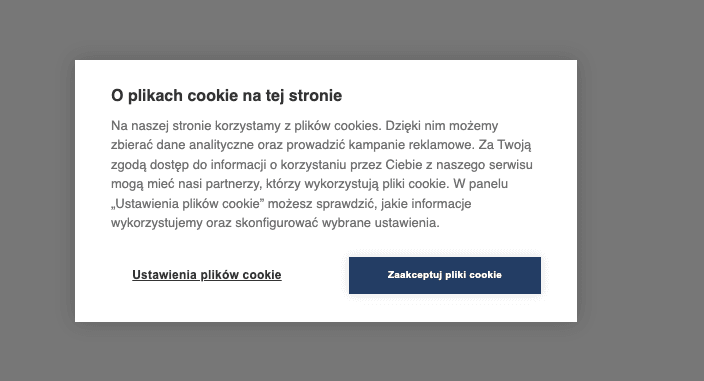
In practice, the vast majority of Polish websites use one type of banner, with two buttons: “Accept” and “Settings”. This configuration, which you'll find on many large websites, is most likely driven by legal departments. Here I'd like to show how the two banner types (two vs. three buttons) affect the number of consents collected.
With a two-button banner (“Accept” and “Settings”), the consent rate for new cookies ranges from 75–90% (n=20, small, medium and large businesses).
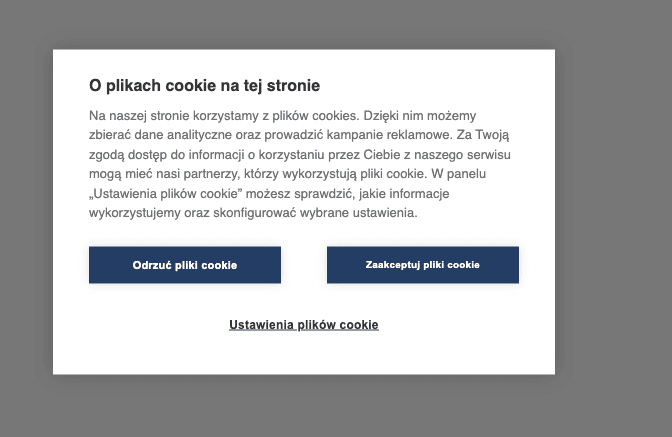
With three buttons (“Accept”, “Reject” and “Settings”), the consent rate is around 40–80%. The wide range comes from the limited sample of accounts and from users' different attitudes to their data. Smaller, specialist websites (with highly aware users) often get much lower consent rates than high-traffic websites.
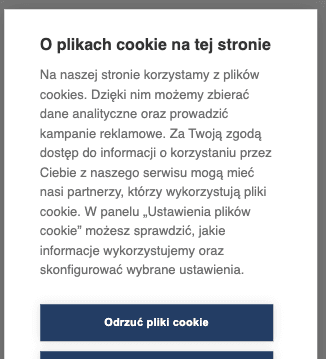
When implementing a cookie banner, check how it looks on every device, both desktop and mobile. You'll often see a poorly optimized banner that nudges users to click the first button they notice. The screenshot below shows an example where the only fully visible button is the one that rejects all cookies. That will cause an unwanted drop in the number of consents collected.
Cookie banner design benchmark
Didomi shared some very interesting results based on data from more than 100 countries and over a trillion page views every month: Didomi - Cookie banner benchmark.
Their report shows that 74% of cookie banner implementations are pop-ups, which makes it the most popular way to collect consent. For comparison, footer banners account for about 24%.
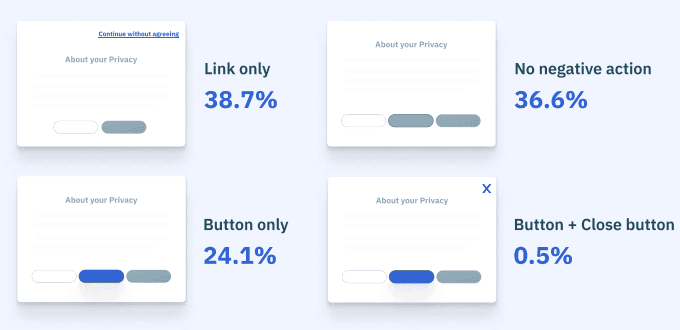
The report also shows how buttons are implemented on banners. The most popular setup in Didomi's cookie management is rejecting cookies by clicking a link on the first layer, chosen by 39% of domains. The second, almost equally common approach was to leave the reject button off the first layer altogether. Only one in four websites implemented a banner with all three buttons styled the same way.
The Didomi report also analyzes cases where making a consent decision is optional (e.g., a floating footer banner that lets you use the site without deciding) and where it is mandatory (a pop-up that blocks the site until you accept or reject cookies). When users are free to respond to the consent request or ignore it, as many as 56–80% skip this step and go straight to the site. When a decision is required, the rejection rate is between 25% and 40%. The gap is obvious at first glance, and it's fair to say that requiring users to state their preferences is worth it.
Summary and recommended cookie banner design
- Display the cookie banner as a pop-up or at the bottom of the page, blocking the content until the user accepts or rejects cookies. A footer banner that doesn't block the page increases the number of people who skip the consent request and make no cookie decision at all. As a result, you can't fire remarketing scripts, and in GA4 it can also make it harder to identify the real traffic source. Users may make their decision on the next page, so the original source of the visit can be lost. The way the GA4 script itself is implemented can also play a role. Still, the best option by far is a pop-up or another banner format that prevents users from using the site until they accept or reject cookies.
- The cookie consent rate with a two-button banner is much higher, at around 90%. The website of the Polish Data Protection Authority links to the report adopted by the European Data Protection Board, which considers such implementations bad practice. Even so, statistics on cookie banners in use show that most companies choose not to offer three buttons on the first layer. Only 24.1% of users of the popular Didomi tool chose that configuration.
- Implement Google Consent Mode v2 so you can get modeled data in GA4. On large websites, you can count on modeled data for users who did not give consent. We cover the implementation in more detail in our articles: https://bettersteps.pl/en/blog/google-consent-mode-v2-practical-guide and on GA4 with Consent Mode vs. without Google Consent Mode: https://bettersteps.pl/en/blog/ga4-with-vs-without-google-consent-mode.