Microsoft Consent Mode isn't new: Microsoft introduced it back in 2023. Another date that matters for any marketing work is May 5, 2025, because since then Microsoft has enforced sending consent signals through its scripts. In this article you'll find out whether the data collected in Microsoft Advertising (Bing Ads) or Clarity is being passed correctly.
What is Consent Mode in the first place? I hope by now it's a familiar term and the definition isn't new to you. Consent Mode is a feature that lets you collect data while respecting the user's choice on a website or in an app. Google's tools use a similar solution. We wrote about Google's approach to Consent Mode in the article: A practical guide to Google Consent Mode v2. The logic of passing data is similar, but keep in mind that the two companies use slightly different solutions, and passing consent to one system correctly doesn't necessarily mean it reaches the other one.
Microsoft Consent Mode: what you should know about Microsoft's consent system
How does the consent mechanism work?
Microsoft Advertising and Clarity work in a similar way. Both tools read the consent the user gave on the site. Microsoft Advertising uses one consent parameter, ad_Storage, while Clarity uses two: ad_Storage and analytics_Storage. Each of these parameters should take one of two values:
- granted, when consent is given: Microsoft scripts can freely read and write cookies. Conversion tracking, ad personalization and remarketing work fully.
- denied, when consent is refused: advertising cookies are not written. The tools switch to a restricted mode that protects the user's privacy and collects only aggregated or anonymized data. Depending on the implementation, the script may not run at all.
For the system to work correctly, the tag's default state has to be set to denied before the user interacts with the cookie banner at all.
Basic mode vs Advanced mode in Microsoft Consent Mode
As with Google (Google Consent Mode 2.0), Microsoft lets you implement its consent mode in two ways. In Basic mode, we block Microsoft scripts until the user accepts marketing cookies (and, for Clarity, analytics cookies). If consent is missing, no data reaches Microsoft. This is the most privacy-protective option, because the script doesn't even run unless the user makes a choice on the cookie banner (clicks the "Accept" button). In Advanced mode, we can run the scripts regardless of consent, but in a default denied state. In this state, only fully anonymous signals, called pings, are sent, and Microsoft strips personal identifiers (PII) from them. These signals serve as an aggregated dataset that keeps some level of traffic visibility. When the user consents, the tag immediately sends an update to the granted state.
Microsoft Advanced mode vs Google Advanced Consent Mode
These two modes sound a lot like Google's solution, and they are indeed close. Like Google, Microsoft has developed data modeling to fill the gaps in Microsoft Advertising data when users decline on the cookie banner. As with Google, you need a sufficient sample: according to information I found on Microsoft's pages, that's a minimum of 700 clicks.
Does Microsoft use the parameters required by Google?
You've implemented Google's consent mode and you're wondering whether you have to redo everything from scratch for Microsoft? Fortunately, no. Microsoft built an architecture that works with the consent ecosystem provided and required by Google.
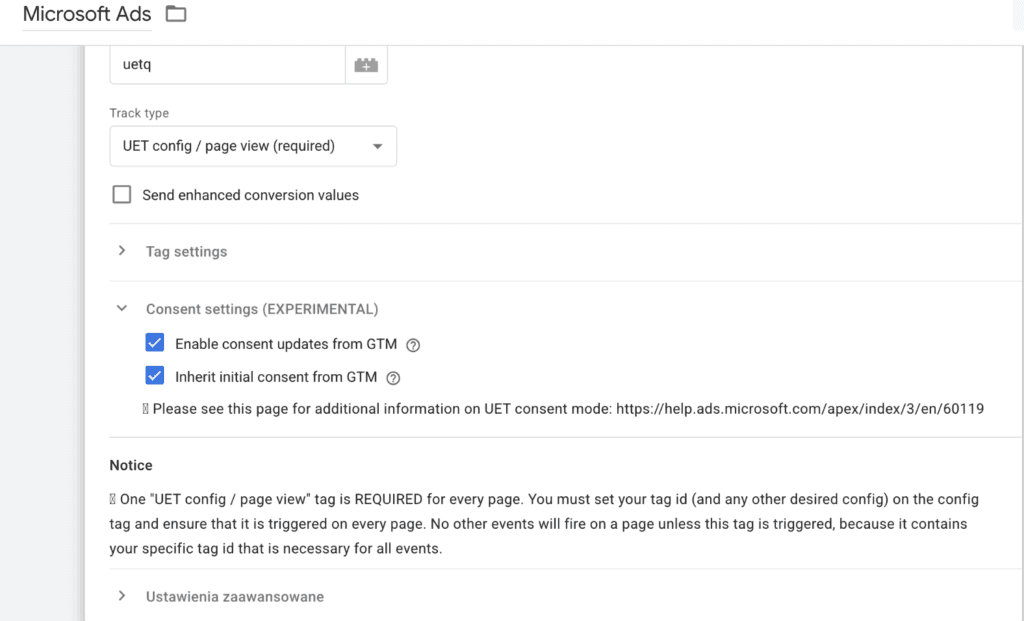
When you deploy Microsoft scripts through Google Tag Manager (trust me, it's the only right way!), the scripts, or more precisely their tag template, offer two options:
- Inherit initial consent from GTM: with this option enabled, the Microsoft tag listens for and automatically picks up the initial state of the ad_Storage and analytics_Storage parameters directly from the Google Consent Mode framework.
- Enable consent updates from GTM: lets the Microsoft tag react smoothly and update to the granted state when the Google Consent Mode API signals that the banner was accepted.
What does Clarity collect when no consent is passed?
Unlike Microsoft Advertising, Clarity (a tool used, among other things, to record user sessions on your site) obviously can't have modeled data for recordings. So what happens when Consent Mode isn't implemented in Clarity according to Microsoft's requirements? Clarity is forced to run in a restricted cookieless mode. In this mode, the tool doesn't store any data in the browser that could identify a session. Instead, it generates a unique, temporary identifier that is valid for one single page view only. Without access to cookies, Clarity forgets who the user is the moment they click a link and go to another page of your site. With no shared identifier, the tool can't stitch those visits into one story. This means a user's journey through 5 different pages won't produce one long recording, but will be treated as 5 completely isolated, unrelated events. Below I go through some areas of Clarity and how they behave when consent is implemented incorrectly or not received at all.
| Area | Description |
|---|---|
| Number of sessions | Every session is a new page view, so the number will be inflated |
| Session recordings | No way to record one continuous session |
| Pages per session | The value will always be 1, because each session equals one page view |
| Returning users | Every user is a new user, regardless of whether they've visited your site before |
| Traffic sources | Traffic ends up as direct |
| Entry and exit pages | Every page is counted as both an entry and an exit page, because the session starts and ends on a single page |
How to check whether Microsoft receives Consent Mode signals correctly
Remember that ticking an option in GTM doesn't guarantee a successful, correct implementation. A lot depends on the solution you have. To verify that consent mode works for data sent to Microsoft Advertising, I recommend the options below.
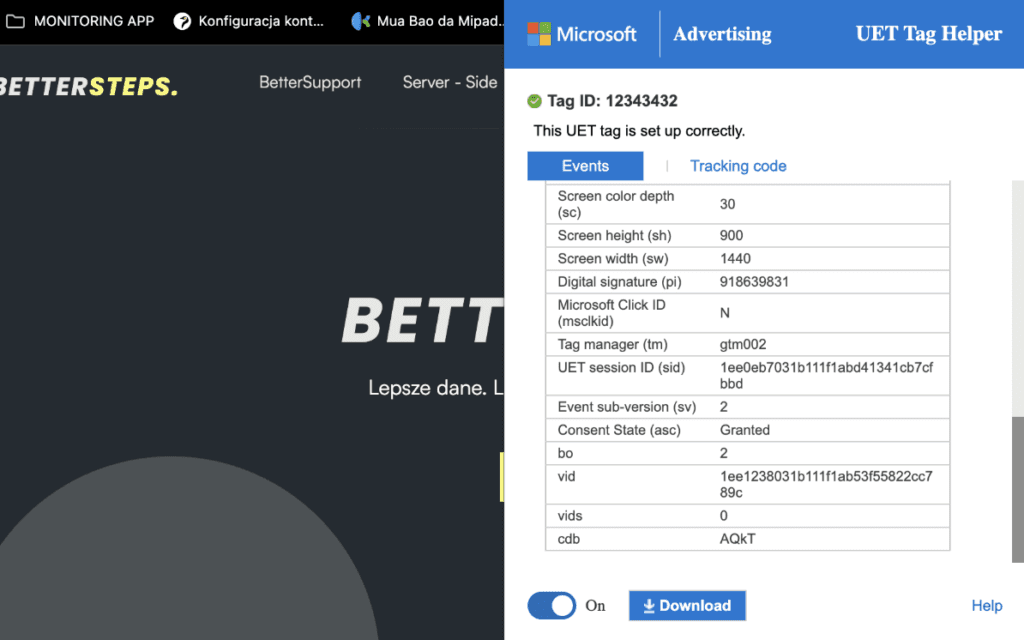
1. The UET Tag Helper extension is Microsoft's official extension for Chrome and Edge. Once you've installed it and opened it on a page where the script runs, check the details of the event being sent:
- find the parameter labeled asc (Ad Storage Consent).
- if you haven't accepted the cookie banner, you should see asc: D (Denied).
- once you consent on the site, the parameter must change to asc: G (Granted) for all subsequent requests.
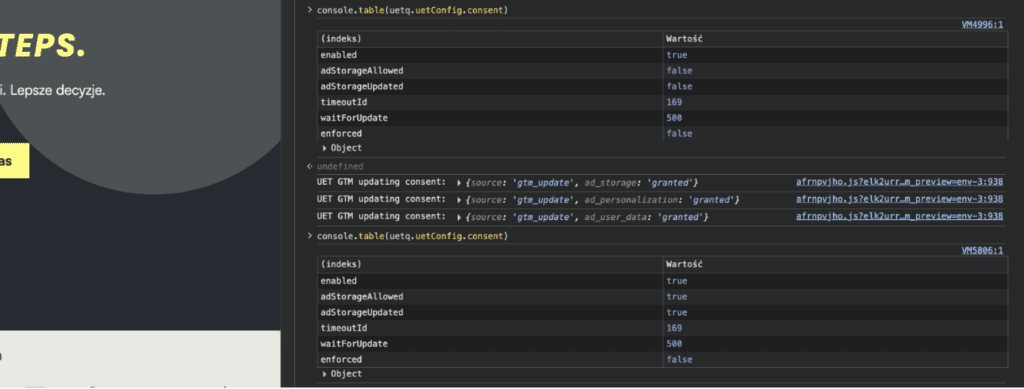
2. The browser console Press F12 in your browser and go to the Console tab. Enter the command:
console.table(uetq.uetConfig.consent)We're interested in two values in the generated table: enabled, which should be true, meaning consent mode is working at all, and adStorageAllowed, which should be false before the user makes a choice on the cookie banner and should automatically change to true after they consent to marketing cookies.
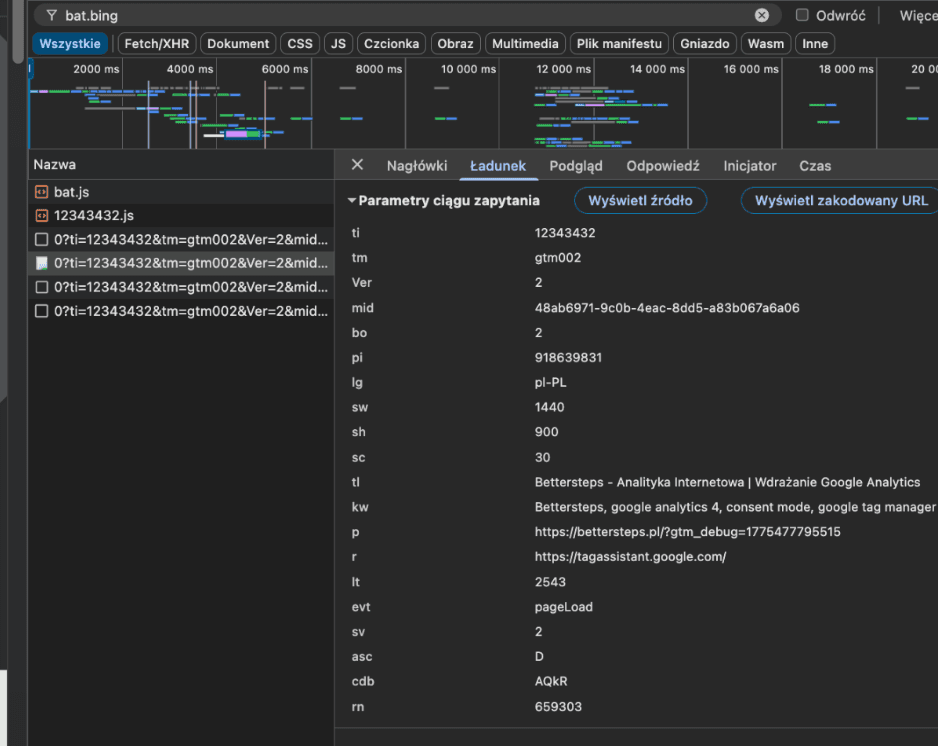
3. The Network tab. Type bat.bing in the filter. Click Payload and check the data being sent. Look for the asc parameter mentioned earlier (D for no consent, G for accepted). If you see this request in Network, Microsoft's servers are definitely receiving this data from your site.
To verify the parameters sent to Clarity, one option is to open the browser console and enter the command:
clarity('metadata', (d, upgrade, consent) => {
       console.log('consentStatus:', consent);
  }, false, true, true);
The values in the response should match the actual consent state, depending on the choice the user made on the cookie banner.
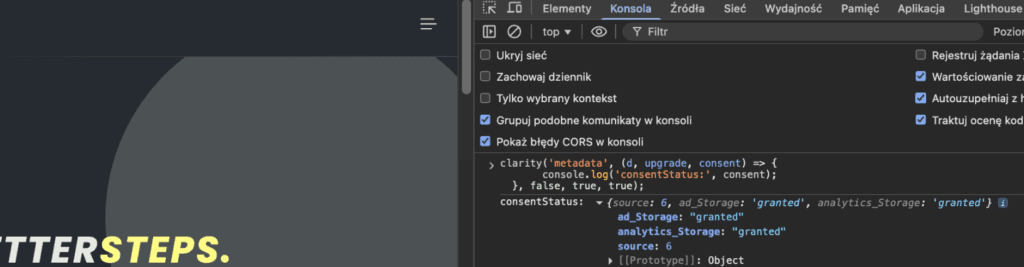
When testing, it's very important to go through every possible user choice. Unfortunately, some implementations map individual categories incorrectly, so I strongly recommend checking several scenarios:
- no choice made on the cookie banner
- cookies rejected
- cookies accepted
- one category accepted and the others rejected (e.g. functional accepted, but marketing and analytics rejected)
Summary
Adding a cookie banner doesn't always mean your data gets through: having one on the site doesn't guarantee that consent signals are passed correctly. If you already use Microsoft Advertising or Microsoft Clarity, test your setup with the verification methods and tools I covered in this article. A correct implementation keeps you compliant with the law, and it also lets you get the most out of Microsoft's platforms.