Rafał Piszczatowski
Reading time: 6:00
GA4 with Google Consent Mode vs. without Google Consent Mode
By law, your website should have a banner that lets users decide about analytics and marketing cookies. Google Consent Mode lets GA4 and Google Ads scripts run even when users don't consent to data collection. In that case no cookies are stored, but pings are still sent to Google Analytics. Based on them, GA4 can fill in the gaps through data modeling and add the missing events without using cookies.
Data collection without Google Consent Mode
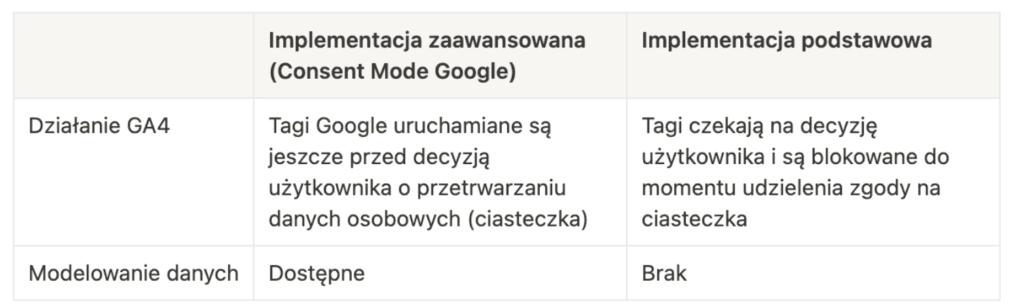
With a correctly implemented consent setup that doesn't use Google's Consent Mode features, your GA4 scripts are blocked. For Google Analytics 4, this means the tool doesn't run at all when there is no consent for analytics cookies. That significantly limits how much data you collect.
So there are two ways to implement consent mode: basic (blocking scripts when there is no consent) and advanced (running scripts and adjusting Google tag behavior based on the user's consent state). The advanced implementation lets you fill gaps in data that would otherwise be unavailable because the script is blocked and Google Analytics 4 never runs on the page.
Implementing Google Consent Mode (advanced implementation)
We've described the full Google Consent Mode implementation (already in the new v2 version) in a separate article: Google Consent Mode v2 implementation guide. It walks you through the implementation step by step, depending on the setup you use.
How GA4 behaves depending on the user's consent choices
Users should be able to choose the purposes their cookies are used for. Data we've collected from clients across industries shows that 99% of users either accept all categories or reject them all. That means only 1% choose individual categories, for example rejecting marketing cookies while accepting analytics cookies.

On the technical side, Google separates these and adjusts how tags behave depending on the specific category. These are the cookie categories you'll come across most often:
- analytics (analytics_storage)
- marketing (ad_storage, ad_user_data, ad_personalization)
- personalization (personalization_storage)
- strictly necessary (security_storage)
- functional (functionality_storage)
With Google Consent Mode implemented correctly, Google Analytics 4 behaves as follows:
- no consent for analytics cookies (analytics_storage=denied)
- Analytics cookies are not set (the main ones are _ga and ga<data stream ID>)
- cookieless pings are sent and later used for data modeling, which means all events are collected, but without a session or client_id attached
- consent for analytics and marketing cookies (analytics_storage=granted and ad_storage=granted)
- IP addresses are collected
- the full URL, including ad click information (gclid), is collected
- third-party cookies previously set on google.com and doubleclick.net, as well as first-party conversion cookies, are available
- advertising cookies are read and written
- Analytics cookies are read
- consent for analytics cookies and rejection of marketing cookies (analytics_storage=granted and ad_storage=denied)
- Google Ads cookies are not read
- data for Google Signals is not processed (what Google Signals is and whether you should turn it on: Should you always activate Google Signals in Google Analytics 4?)
- the full URL, including ad click information (gclid), is collected. However, the data is only used to approximate the actual volume of paid traffic (google/cpc)
Which GA4 properties can use Google Consent Mode modeling?
According to Google's documentation, data modeling only works if you meet certain requirements:
- at least 1,000 events per day with analytics cookies denied (analytics_storage=’denied’) for at least 7 days
- at least 1,000 users per day with analytics cookies accepted (analytics_storage =’granted’) for at least 7 of the last 28 days
These are GA4's baseline requirements. In our experience they are not absolute: we've seen properties with less traffic where modeled data still showed up.
For Google Consent Mode to work, you need to meet two conditions:
- have the right data structure for Google Consent Mode (here already v2, with the ad_personalization and ad_user_data parameters)
{
  'ad_storage': 'denied',
  'analytics_storage': 'denied',
  'ad_personalization': 'denied',
  'ad_user_data': 'denied',
  'personalization_storage': 'denied'
  'security_storage': 'denied',
  'functionality_storage': 'denied'
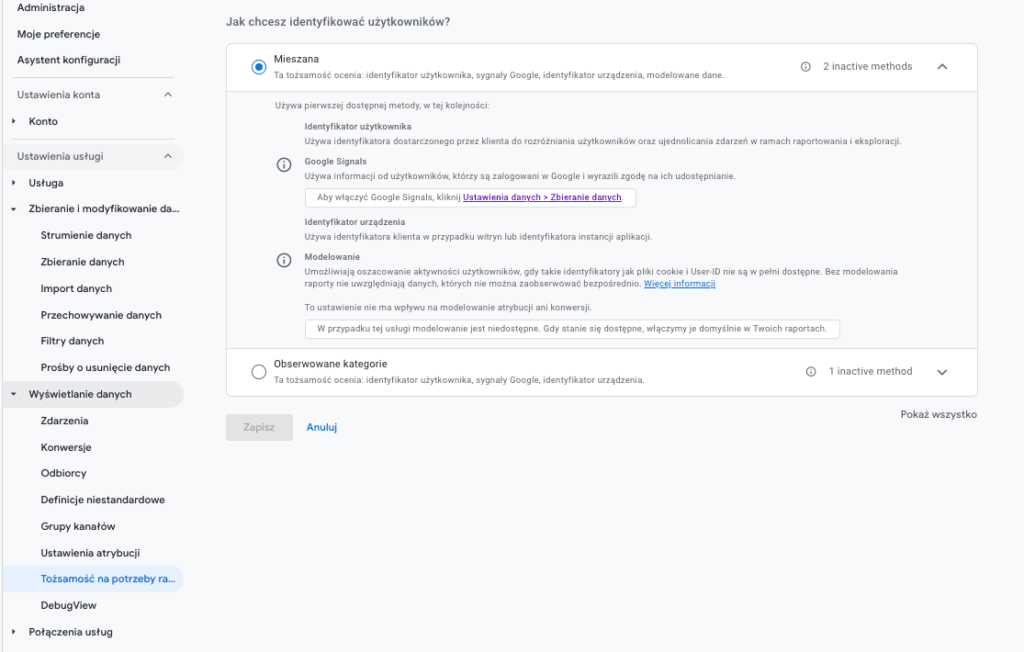
}- set “Reporting identity – Blended” in your GA4 property
If the property has modeled data, your reports will show a message saying so. That tells you GA4 is using data from users who didn't consent to analytics cookies.
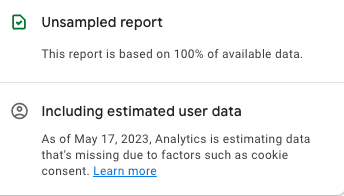
Besides the message that the data includes estimated user data, you may see these messages:
- no estimated user data: reporting identity is set to Blended, but there isn't enough data for GA4 to estimate what's missing
- estimated user data unavailable: blended reporting identity was not enabled for the selected period, or you're using something like a sequence segment.
What data is modeled when users don't consent to cookies?
Without consent, events aren't tied to a specific cookie. In practice, you might see 10 page_view events (page views), and GA4 can't tell whether they came from 1 user or 10. With modeling, GA4 assigns them values based on consenting cookies that behave similarly on your site. That's why the minimum requirements described above are necessary for Google to estimate the data correctly and accurately. Without a large enough data sample it wouldn't be possible, so low-traffic websites can't use this feature. GA4 only shows modeled data when it is confident in the model's quality, and then it tells you so in the property (a note that the data includes estimated user data). GA4 collects all events and, thanks to modeling, assigns the right number of sessions and users to them.
Limitations of modeled data
Modeled data has its limitations, and you can't use it the same way as data from users who accepted cookies. Without the user's cookies you can't use Audiences, build segments, or send them to Google Ads, for example. Other unsupported features include the user explorer and user lifetime explorations, sequence segments, retention reports and predictive metrics. In other words, anything that relies on specific cookies or analyzes events per user or per group of users.
The impact of implementing Google Consent Mode in Google Analytics 4
To verify the differences in data, we ran several implementations. One property collected data without data modeling, and the other had modeling enabled. Results may vary depending on the size of the account and the share of declined consents. The data below comes from a website with a two-button banner and an 87% consent rate for analytics cookies.
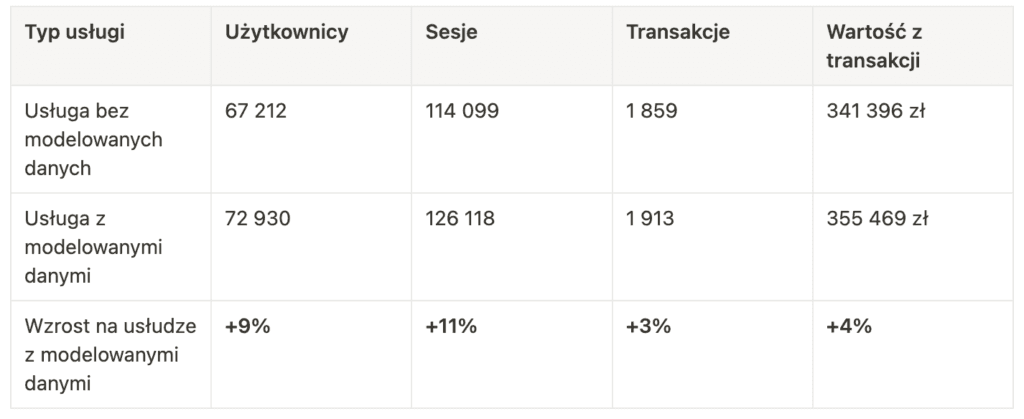
The results show that GA4 did a fairly good job of attributing sessions from users who hadn't consented. The property with modeled data showed 11% more sessions (with a 13% consent decline rate). Interestingly, this didn't translate into a similar increase in sales. That means this segment, based on the pings sent, didn't behave the same way or convert at the same rate. The modeling worked correctly. We also compared the data with CRM results, and the share of sales captured in GA vs. the CRM stayed the same (before implementing cookie consent and after implementing Google Consent Mode with data modeling).
Summary
Given how much emphasis is now placed on data privacy, enabling and using Google Consent Mode is becoming an essential part of Google Analytics 4. Apart from the legal requirements and Google's upcoming checks on Ads accounts, it's one of the more important GA4 features, because it gives you more accurate data and lets you collect event data even without cookie consent. It should be a must for every company that:
- uses GA4
- has at least 30,000 website users per month
- has a correctly implemented cookie consent setup and respects users' cookie choices