Adam Brzostek
Reading time: 3:00
Analytics news: March 2023
Until now, GA4 only offered the default channel group. It was much more accurate than in Universal Analytics, but the lack of flexibility, even in naming, could be a problem. Fortunately, that's in the past. You can now create your own custom channel groups. To do that, go to Admin → Property → Data Settings → Channel Groups
You can build a channel group completely from scratch or use the default channel group as a starting point.
The new feature lets you set up a channel taxonomy that fits how your business works, define more precise criteria for each channel or, if needed, break out a less obvious source as its own channel.
Here's everything you can do:
- Create a new channel group
- Edit an existing channel group
- Delete an existing channel group
- Edit a channel in a group
- Add a new channel to a group
- Remove a channel from a group
- Reorder channels in a group
The channel groups you create are available in custom reports and in Explorations, and, most importantly, they apply to both new and historical data.
Detailed setup instructions (for now only in English) are available here: https://support.google.com/analytics/answer/13051316?hl=pl
GA4 | Item-scoped custom dimensions
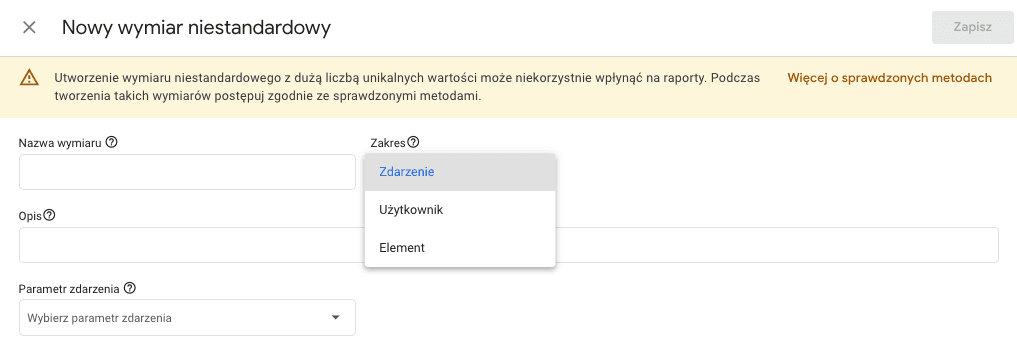
Something GA4 has been missing for a long time is finally here. The enhanced ecommerce standard already gives you many more built-in parameters, including as many as 5 category levels you could use however you liked, but for some industries that wasn't enough. You can now create item-level custom dimensions and use them in standard reports and in Explorations. Standard properties can register up to 10 of these parameters, and 360 properties up to 25. You set them up in the same place as other custom definitions, but you need to choose the right scope (and, as usual with GA4, the Polish interface labels are a bit clumsy).
GTM | Floodlight tags in server-side GTM now support user-provided data
If you use server-side tagging, you can now enable user-provided data in your Floodlight tags. It's the same feature that was already available in client-side tagging. Just tick the checkbox and you should be able to count enhanced conversions in Google Ads.

Looker Studio | New fields in the Google Analytics 4 connector
New fields available in the Google Analytics 4 connector:
- Items added to cart
- Items checked out
- Items clicked in list
- Items clicked in promotion (banner)
- Items viewed
- Items viewed in list
- Items viewed in promotion (banner)
With these fields, it's easy to build a product performance report.
