Web analytics has always had a built-in measurement error caused by ad blockers and other tracking restrictions. Even so, the share of lost data was small enough that the numbers stayed reliable and statistically significant, and you could base sound business decisions on them.
Adam Brzostek
Reading time: 12:00
Consent Exception Tracking: understand it and set it up yourself
Since 2024, when the Digital Services Act came into force and required website owners to obtain consent for tracking based on client-side identifiers, working with data has become genuinely hard. A high consent rejection rate combined with Google Analytics' opaque algorithms can make reliable statistics practically impossible.
Does that mean we have no choice but to make decisions based on trends of questionable quality?
Not quite.
What is consent exception tracking?
Consent exception tracking is a specific model that allows analytics tracking without consent. The idea is that you collect fully anonymized data that cannot identify the user in any way and is used for statistics only.
To use this model in compliance with GDPR, you have to meet a few essential prerequisites:
- Full IP anonymization - the IP address must be truncated as soon as any request is received
- No fingerprinting - you don't collect any device data that could identify the device
- No cross-site tracking - you can't track the user on third-party sites
- No data export - the data can only be used for your own purposes and can't be shared with any third parties, such as marketing platforms like Google or Meta.
This means consent exception tracking lets you collect information about every interaction that happens on your site. The downside is that you give up user-level analysis entirely, including telling new users from returning ones.
What information will I get with consent exception tracking?
Besides event data, this model allows short-lived session identifiers that group the collected events into a single visit, provided they don't live longer than one session.
So with this approach you can collect not only the number of events, but also the number of sessions, and see what happened during those sessions.
What about traffic sources?
More good news: this model lets you collect traffic source data, but attribution only works on a last click (direct included) basis. That's because there is no persistent identifier linking a user's visits over time, so you can only rely on data within a session.
This leads to another quirk that sets this attribution apart from the last click model you know from Google Analytics, for example. In consent exception tracking, direct traffic gets more credit, because unlike last non-direct click, it isn't ignored when a returning customer comes back.
What about device data, then?
Device data lives in the HTTP header called User-Agent. You can read it, but you have to keep it general enough that you don't accidentally create a user fingerprint. Here is what you can use:
| Data dimension | Can we use it? | Notes |
|---|---|---|
| Device type | YES | You'll see a breakdown into Desktop, Mobile, Tablet, Smart TV. This is low-uniqueness data, so it's safe. |
| Operating system | YES | You'll see: Windows, Android, iOS, Linux. |
| OS version | Partially | Instead of "Android 13.0.1" you may only see "Android 13" or just "Android". A version that is too precise is risky. |
| Browser | YES | You'll see: Chrome, Safari, Firefox. |
| Screen resolution | NO / Limited | In strict privacy mode (e.g. the CNIL configuration in Piwik PRO/Matomo), this parameter is often removed or rounded, because it strongly points to a specific phone or monitor model. |
| Device brand/model | NO / Limited | Instead of "Samsung Galaxy S22 Ultra" you may see a generic "Samsung" or "Android Device". |
So I won't have any information about the user?
The line is very thin here, but if you meet a few conditions, you can collect a user ID.
First of all, the rules from the first section of this article still apply: collecting a User ID should serve technical or security purposes, not marketing.
To be on the safe side, hash the user ID before storing it.
Second, your terms of service are the foundation. If the terms users accept when they register state that you'll use their data to analyze behavior on your site, you're entitled to send the user ID without consent from the CMP.
Which platforms offer consent exception tracking?
Popular analytics platforms already offer consent exception tracking.
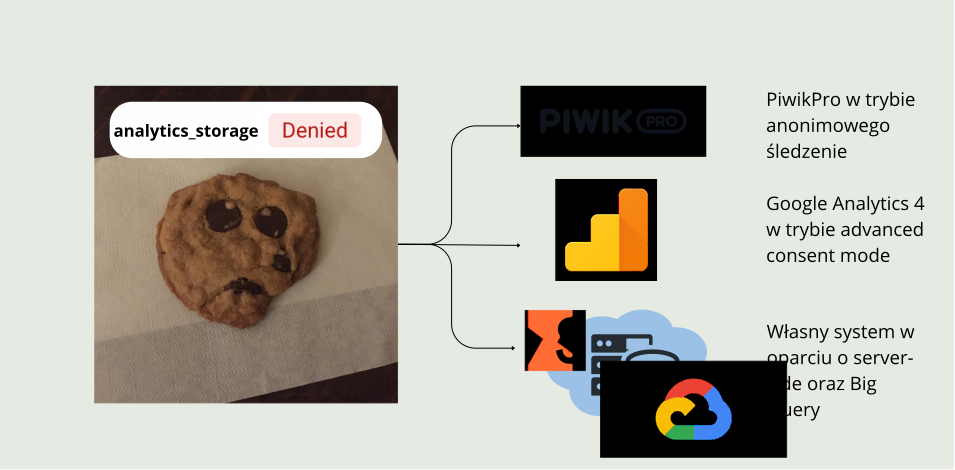
Google Analytics
With the right GTM configuration, you could say that Google Analytics works in this model to some extent. I mean a setup based on Advanced Consent Mode, where GA4 tags fire even without consent and send pings to the tool, that is, signals stripped of certain information, including the client ID and session ID. It's a specific form of consent exception tracking, because the GA interface doesn't show actual data, only modeled data. You'll find more on this in the official documentation: https://support.google.com/analytics/answer/11161109?hl=pl
Piwik Pro
Another platform that offers this data collection model is Piwik Pro, which has two versions of this kind of tracking:
- anonymous tracking with a session hash: it doesn't use cookies, but generates a short-lived session hash (e.g. for 30 minutes) from the anonymized IP address and the User-Agent (browser data). This lets you group events into a single visit, but you can't recognize a returning user the next day.
- anonymous tracking (no cookies, no session hash): the main subject of this article. Piwik PRO stores nothing in the browser and creates no hash linking events. Every page view and every click (ping) is a completely independent, isolated entity for the server.
We've already covered the second model in detail on our blog: https://bettersteps.pl/en/blog/analytics-without-consent-piwik-pro-test
Your own system
The last option is to build your own system. You can do it with server-side tracking and Google BigQuery, and that's the setup I'll walk you through in this article.
How to implement consent exception tracking
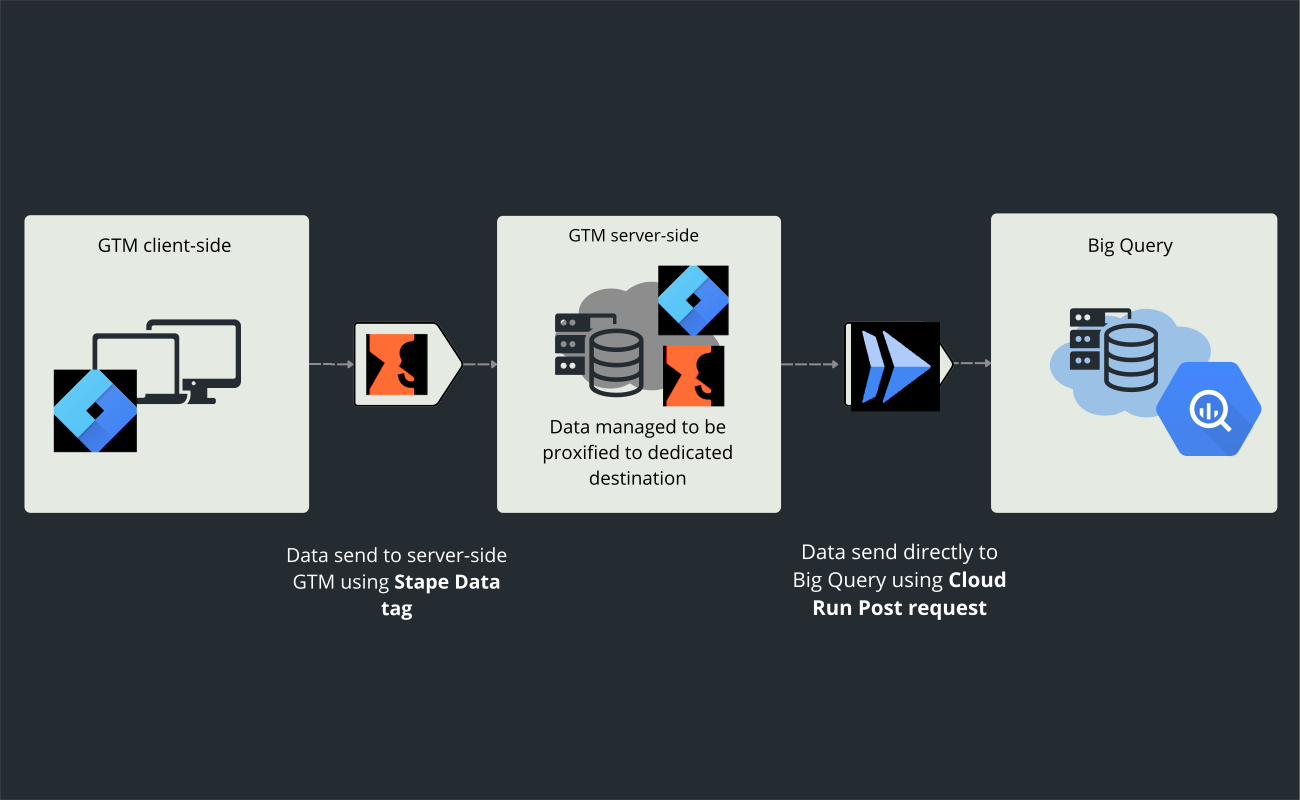
Here is how the system will work. On the client side, we'll send data to sGTM with the Stape Data Tag, and sGTM will pass the data straight to a dedicated BigQuery table through an HTTP POST request handled by a Cloud Run instance we'll create.
Subscribe to the newsletter to read the rest of this article
Join the Bettersteps newsletter to read the full article for free
When you sign up with this form, you'll get access to the full article, plus an email with a link to download ready-made JSON files for the GTM web and GTM server containers and the configuration files for Google Cloud
Preparing Google Cloud (GCP)
The first step is to prepare your Cloud project to receive and store the requests sent from the site. To do this, you need to create:
- A service account for the system
- A dedicated BigQuery table with the right schema
- A Cloud Run instance that handles requests from the site
Service account
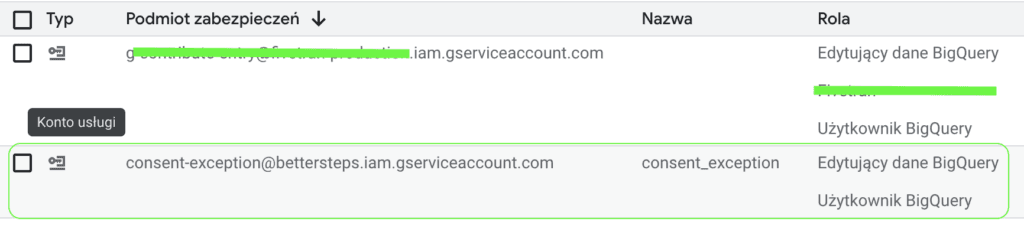
This is the easiest part of the whole exercise. Create a regular service account and grant it the BigQuery Data Editor role. The account needs it to write data to the table on your behalf.
BigQuery table
In the dataset of your choice, create a table using the Empty table option and define the schema with the text editor (Edit as text):
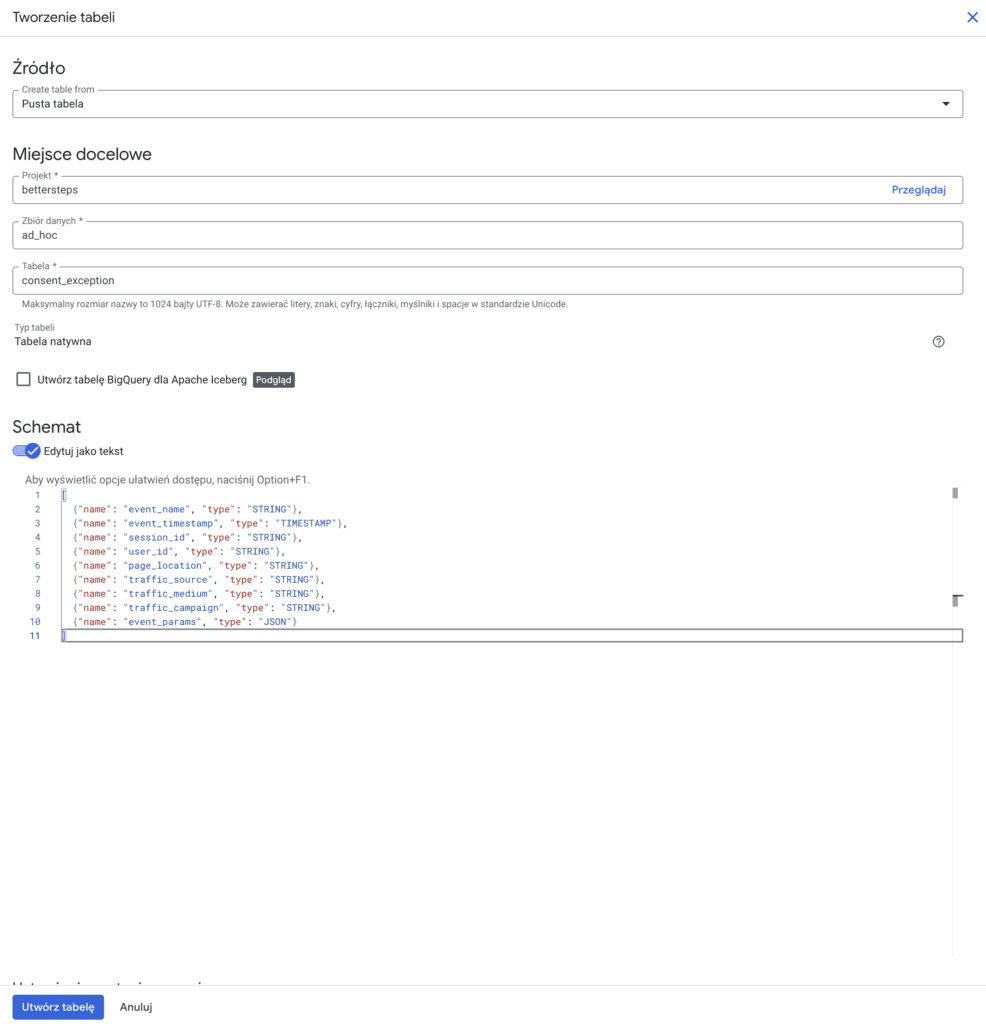
Schema:
[
  {"name": "event_name", "type": "STRING"},
  {"name": "event_timestamp", "type": "TIMESTAMP"},
  {"name": "session_id", "type": "STRING"},
  {"name": "user_id", "type": "STRING"},
  {"name": "page_location", "type": "STRING"},
  {"name": "traffic_source", "type": "STRING"},
  {"name": "traffic_medium", "type": "STRING"},
  {"name": "traffic_campaign", "type": "STRING"},
  {"name": "event_params", "type": "JSON"}
]
Cloud Run
Now for the most complicated part of the task: creating a dedicated Cloud Run instance.
Enabling the APIs
First, make sure all the required APIs are enabled
- Cloud Run - deploying and hosting the service
- Cloud Build - building the Docker image
- Container Registry (or Artifact Registry) - storing the image
- BigQuery - writing data to the table
- IAM - roles, service accounts, permissions
- Service Usage - lets you enable other APIs
- Cloud Logging - Cloud Run logs (debugging)
- Cloud Storage - used by Cloud Build (bucket for builds)
You can also do this with a single command in Cloud Shell
- In Google Cloud, open Cloud Shell (the >_ icon in the top right corner of the console).
- Paste the command below into Cloud Shell and press Enter:
gcloud services enable \
  run.googleapis.com \
  cloudbuild.googleapis.com \
  containerregistry.googleapis.com \
  bigquery.googleapis.com \
  iam.googleapis.com \
  serviceusage.googleapis.com \
  logging.googleapis.com \
  storage.googleapis.com
Creating the index.js file
Next, create an index.js file locally. It holds the instructions for the system. In short, it's code with a set of commands that tell Cloud Run how to handle incoming requests from the site, that is, write them to your BigQuery table
In any folder, create a text file named index.js and paste the code below into it:
const express = require('express');
const bodyParser = require('body-parser');
const { BigQuery } = require('@google-cloud/bigquery');

const app = express();
app.use(bodyParser.json({ limit: '1mb' }));

const bigquery = new BigQuery();

const DATASET = '<nazwa Twojego datasetu>';
const TABLE = '<nazwa Twojej tabeli>';

app.post('/', async (req, res) => {
  try {
    const e = req.body;

    if (!e.event_name || !e.session_id || !e.page_location) {
      return res.status(400).json({ error: 'Missing required fields' });
    }

    let eventParams = {};
    if (e.event_params) {
      if (typeof e.event_params === 'object') {
        eventParams = e.event_params;
      } else if (typeof e.event_params === 'string') {
        try {
          eventParams = JSON.parse(e.event_params);
        } catch {
          eventParams = {};
        }
      }
    }

    const row = {
      event_name: String(e.event_name),
      event_timestamp: e.event_timestamp
        ? new Date(e.event_timestamp)
        : new Date(),
      session_id: String(e.session_id),
      user_id: e.user_id ? String(e.user_id) : null,
      page_location: String(e.page_location),
      traffic_source: e.traffic_source ? String(e.traffic_source) : null,
      traffic_medium: e.traffic_medium ? String(e.traffic_medium) : null,
      traffic_campaign: e.traffic_campaign ? String(e.traffic_campaign) : null,
      event_params: JSON.stringify(eventParams)
    };

    await bigquery
      .dataset(DATASET)
      .table(TABLE)
      .insert([row]);

    res.status(200).json({ status: 'Inserted' });

  } catch (err) {
    console.error('BigQuery insert failed:', err);
    res.status(500).json({ error: 'BigQuery insert failed' });
  }
});

const PORT = process.env.PORT || 8080;
app.listen(PORT, () => {
  console.log(`Server listening on port ${PORT}`);
});
Don't forget to replace the dataset and table names in the file
Creating the Cloud Run service
In Cloud Shell, create a project folder with the following commands:
mkdir cloudrun-bq
cd cloudrun-bq
Then install the BigQuery and body-parser packages
npm init -y
npm install @google-cloud/bigquery express body-parser
Now upload your index.js file to the directory
- Click the Upload icon (up arrow) in Cloud Shell
- Select your index.js file
- Wait for the upload to finish
Creating the Dockerfile
In the terminal, in the cloudrun-bq folder, create a Dockerfile:
touch DockerfileOpen it in the nano editor:
nano DockerfilePaste in the code below:
FROM node:18-slim
WORKDIR /app
COPY package*.json ./
RUN npm ci --omit=dev
COPY . .
ENV PORT=8080
CMD ["node", "index.js"]
Save the changes → Ctrl + O, Enter
Exit nano → Ctrl + X
Build the Docker image
gcloud builds submit --tag gcr.io/bettersteps/cloudrun-bqCreate the Cloud Run container
Now leave the Cloud Shell editor and create the Cloud Run container manually
Before you do, I recommend reading our article on Cloud Run pitfalls: https://bettersteps.pl/en/blog/server-side-gtm-cloud-run-setup-pitfalls
Once you've read it, you can move on to the configuration.
Open Cloud Run in your GCP project

In the left navigation menu, go to Services and click "Deploy container"

In the Container image URL field, enter the address of the image you built with Cloud Build, e.g.:
gcr.io/bettersteps/cloudrun-bqIn the Service name field, enter any name for your container
For the region, choose: europe-west
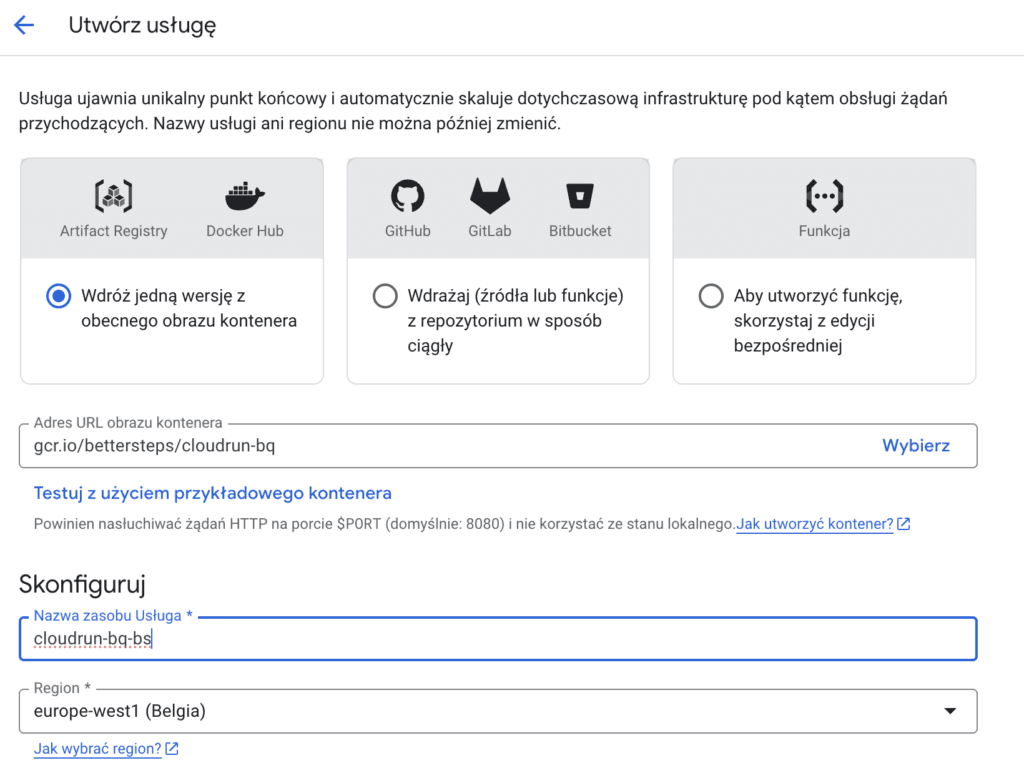
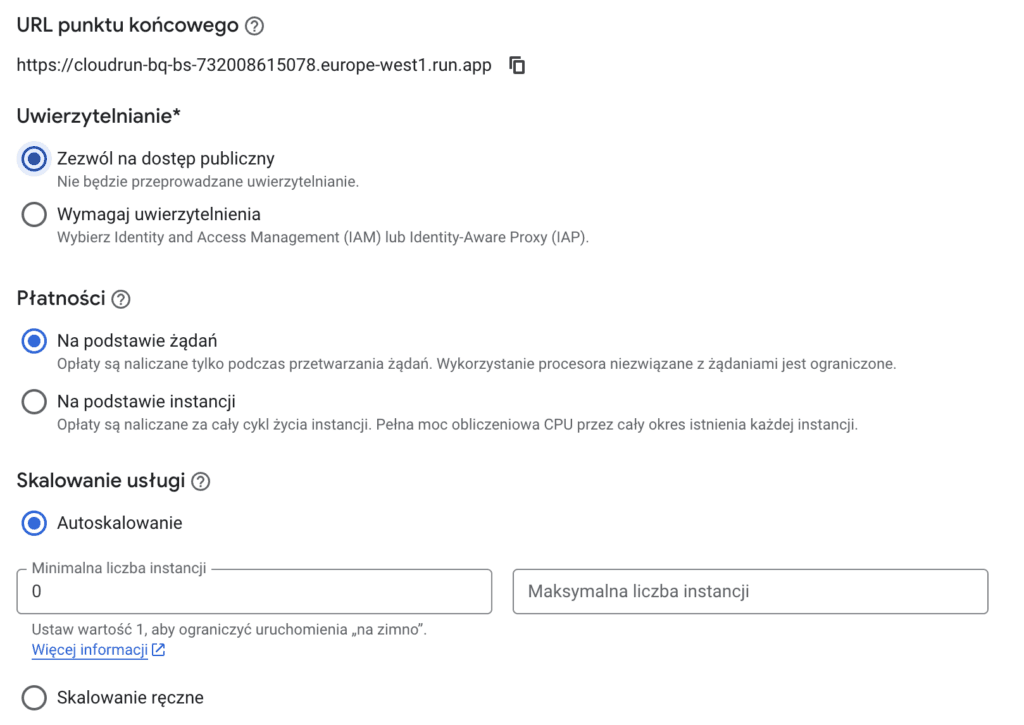
In the Authentication section, allow public access.
Choose request-based billing.
Leave autoscaling starting from zero.
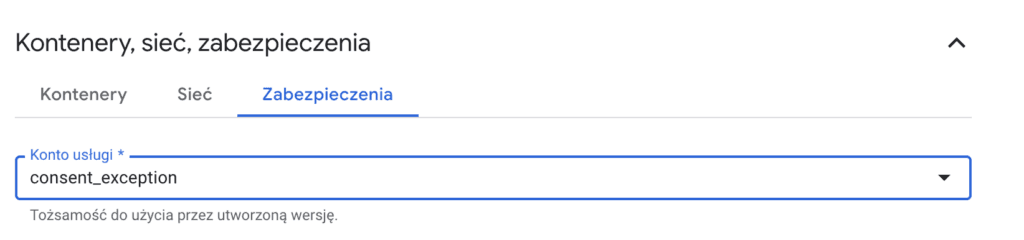
The last thing to change is the service account in the Security section. Select the one you created earlier with access to BigQuery, since it will write the data there.
Click Create and wait a moment while Cloud Run creates the service.
When the deployment finishes, Cloud Run shows the service URL.

This is your endpoint, which we'll use in sGTM to send events.
Sending data to sGTM
There are many ways to send data to sGTM. The simplest and most common one is to use GA4 tags. Since we want the whole process to be cookieless, that method won't work for us.
We'll use the Stape Data Tag instead.

It's a ready-made template from Stape that makes it easy to configure an HTTP POST request to our server.
Before we configure the tag, we need to create variables that describe our traffic.
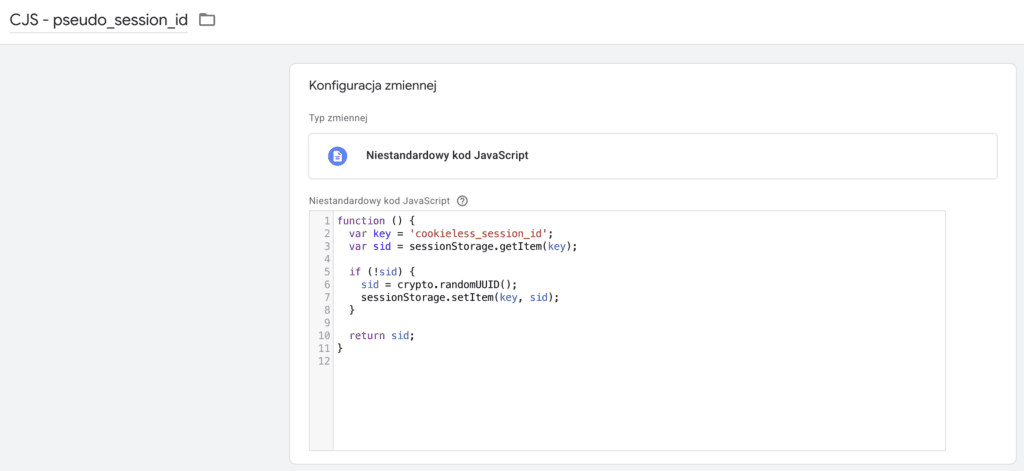
Pseudo session ID
As mentioned in the introduction, the consent exception tracking model allows short-lived session identifiers that work within a single session. We need such an identifier to link events from the same visit.
In your GTM container, create a custom variable that generates this unique identifier and stores it in session storage, so it expires when the browser is closed.
Traffic sources
In the JSON file for the GTM web container included with this material, you'll find a Custom HTML tag with code that captures traffic sources within the session and saves them to session storage, just like the pseudo session ID.
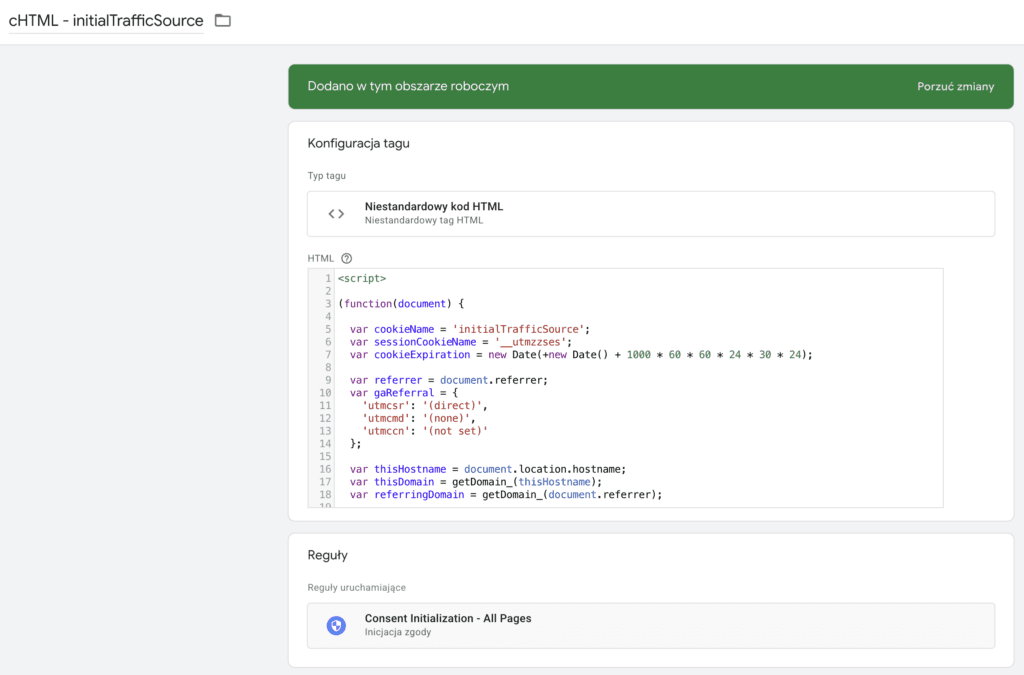
We explain how this tag works in detail on our blog: https://bettersteps.pl/en/blog/ga4-attribution-traffic-source-tracking-script
The code is slightly modified and stores the following in session storage:
- current source - traffic_source
- current medium - traffic_medium
- current campaign - traffic_campaign
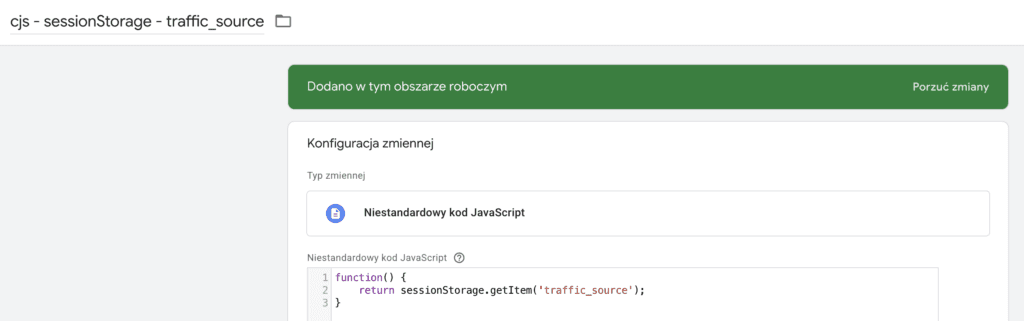
To read this information and send it to the server, create 3 similar Custom JavaScript variables, as in this example:
Configuring the Stape Data Tag
With all the variables describing our traffic in place, we can configure the Stape Data Tag.
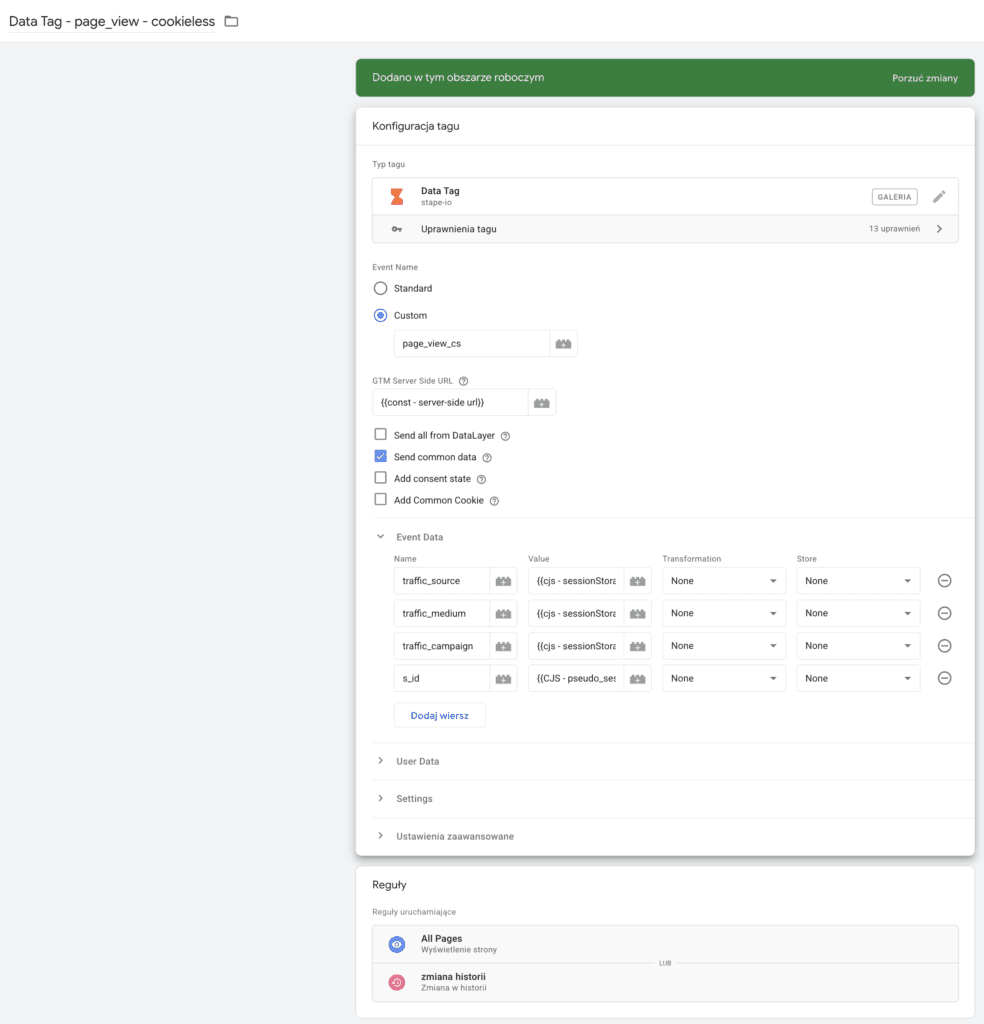
As the event type, choose Custom to declare your own unique event that no other tags in sGTM will use. In this example I want to send a page view event, but I add the “_cs” suffix at the end so I know it's a cookieless event.
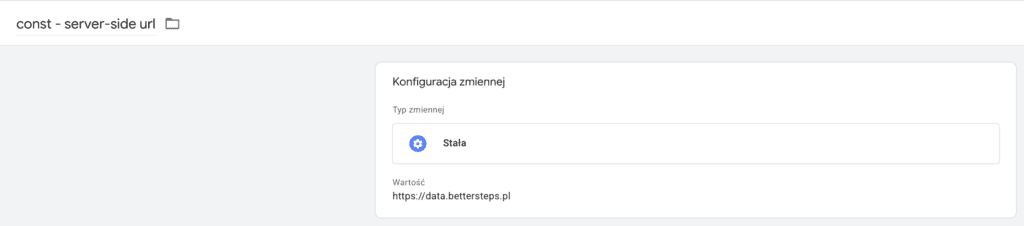
I need to enter the URL of my tagging server, stored in the const - server-side url variable.
I check the Send common data checkbox to receive the standard URL parameters:
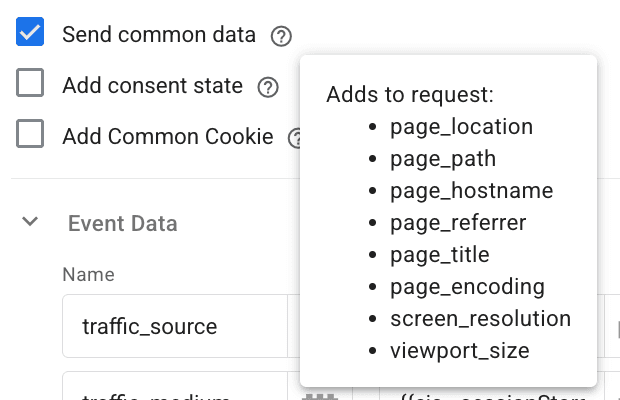
Then I declare my custom parameters: the traffic sources and the non-persistent session identifier, s_id.
I added triggers that fire on each new page view, and that's how I set up sending page view data to my tagging server.
Handling incoming requests in sGTM
Stape Data Client
To receive requests sent by the Stape Data Tag, you need to configure the Stape Data Client in your server container. There is no template gallery for custom sGTM clients yet, so it's best to download the latest version of the template from Stape's official GitHub profile: https://github.com/stape-io/data-client
You'll find installation instructions here: https://stape.io/blog/sending-data-from-google-tag-manager-web-container-to-the-server-container#how-to-send-data-from-the-google-tag-manager-web-to-the-server-container
You only need steps 5 to 9 of those instructions.
Sending the event to BigQuery
To make things easier, start by creating a variable that stores the URL of the Cloud Run instance you created earlier.
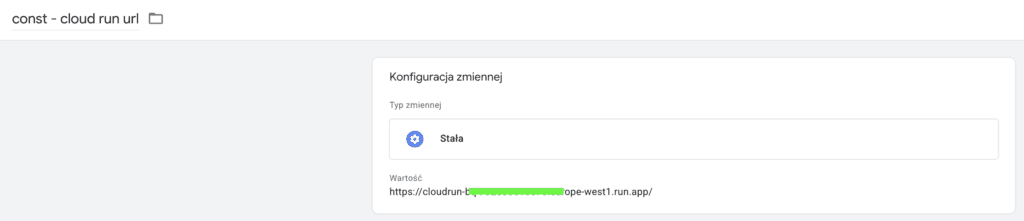
Next, create a tag of the HTTP Request type.
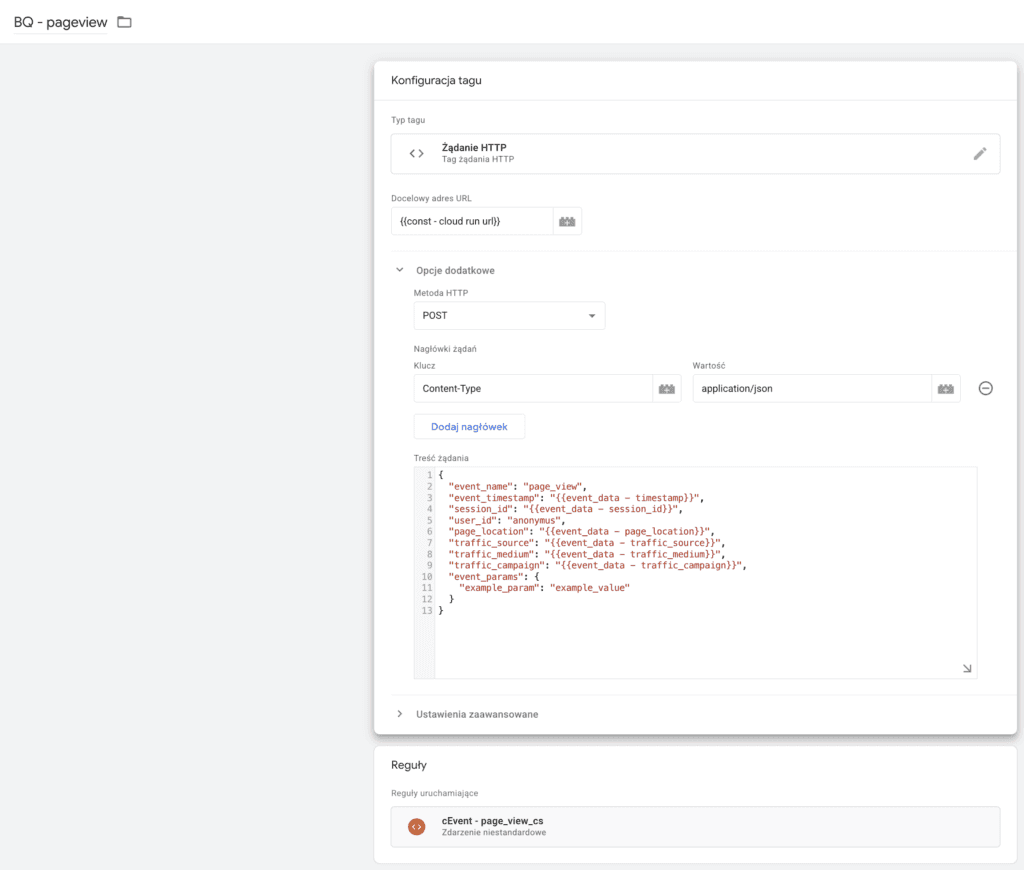
Enter your Cloud Run URL there, stored in the const - cloud run url variable you created earlier.
Choose the POST method
Set the Content-Type header key to the value application/json.
In the request body, declare JSON that matches your BigQuery table and the format declared in the index.js file
For the parameter values, use variables that capture the data sent from the site, e.g.:
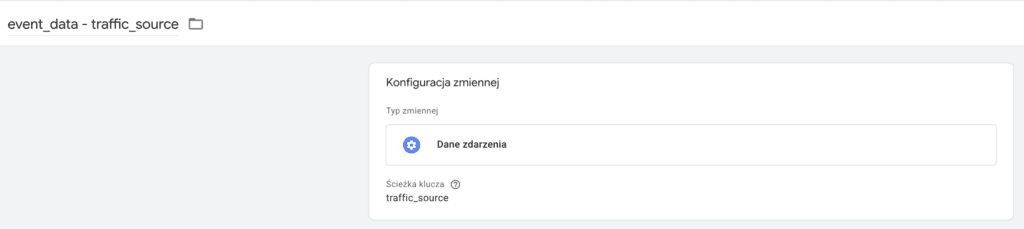
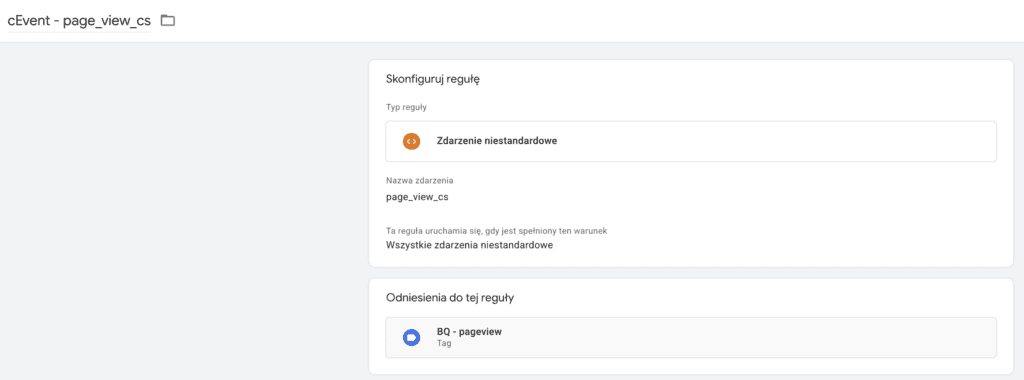
As the trigger, choose the event you declared when sending data from the site, e.g.:
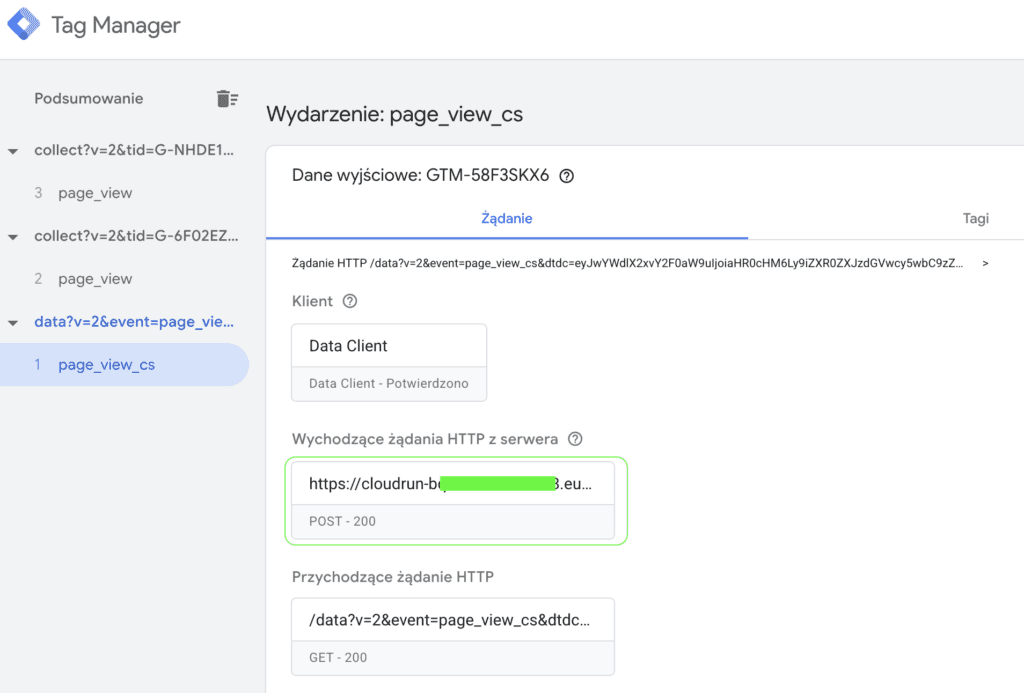
In Preview mode, the request should have status 200, which means it was sent to your BigQuery table successfully:
The tag preview makes it easy to see what data is being sent:
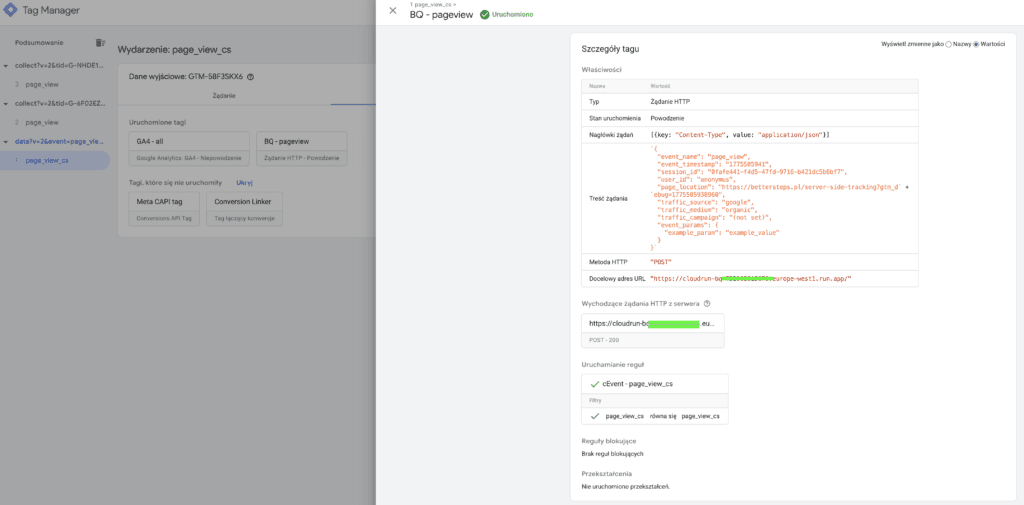
If the request returns a status other than 200, check the logs and make the necessary changes. Sometimes it's just a matter of changing the data format to match the table requirements, but you may also need to update the index.js file and redeploy the Cloud Run instance.
In this guide we implemented the page view event, but you can implement any other event the same way. Just remember to follow the guidelines of your local regulators and collect only the information for which you have a legitimate interest.
How to use the JSON files
The files are set up to handle the page view event
For the model to work, you first need to prepare Google Cloud Platform, that is:
- create the BigQuery table
- create the Cloud Run instance
GTM client side
- Import the container
- Update the const - server-side url variable
GTM server side
- Import the container
- Update the const - cloud run url variable
Once debugging checks out, publish both containers
Follow our profiles so you don't miss more useful content
