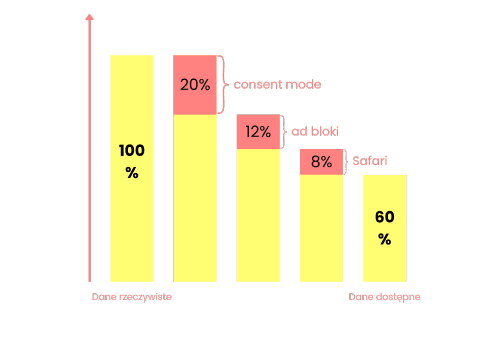
With a strong focus on personal data protection and ever newer user privacy regulations, web browsers keep adding restrictions on 3rd party cookies.
In the context of Meta, a good example is Apple, which significantly restricted 3rd party cookies in Safari, cutting their lifetime to just 7 days. That makes running and optimizing marketing campaigns considerably harder.
It looks like regulations will keep moving in this direction, and technology vendors will have to adapt to them.
Add the fairly high ad blocker adoption in Poland, and soon your marketing and analytics will be based on a fraction of the real data.
Adam Brzostek
Reading time: 4:00
Meta Conversions API: what, why and how? A step-by-step guide
One answer to these restrictions is server-side tracking, which you can read more about in several articles on our blog:
What is the Meta Conversions API?
For Meta Ads, the tool that helps with the challenges described above is the Meta Conversions API, commonly called CAPI.
CAPI is designed to create a direct and more reliable connection between data from your own systems (website, app, CRM) and Meta.
In theory, this connection can bypass the browser entirely, so it doesn't rely on 3rd party cookies the way the pixel does. This means you can send a much wider range of events than just website interactions, because you can extend tracking to, for example, CRM events describing order statuses.
Sounds great, right?
Unfortunately, in practice it's a fairly complicated process. You really can implement the Meta Conversions API without the browser, but you have to consider how complex that implementation can get:
- a developer has to code the sending of events to Meta on the backend or server side
- you have to pass a customer identifier, which may not be easy to get even for logged-in customers, and for logged-out ones has to come from the browser anyway (the _fbp and _fbc cookies)
- you have to comply with data protection rules: even though some identifiers, such as email, are sent to Meta hashed (SHA-256), you still need the user's consent
You can still implement the Meta Conversions API with the browser involved, combining client-side tracking with server-side GTM, and the results are more than satisfactory.
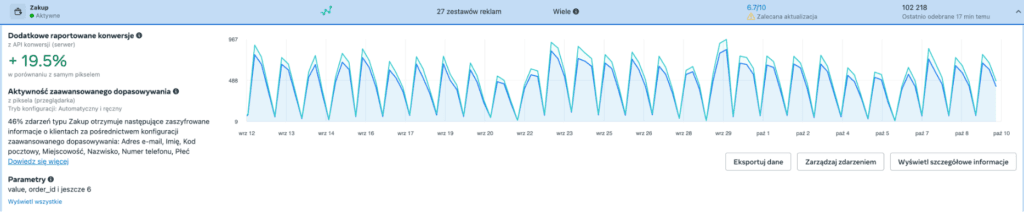
The example above is just one of many where implementing CAPI increased the conversions reported in Meta Ads.
How does the Meta Conversions API work with server-side GTM?
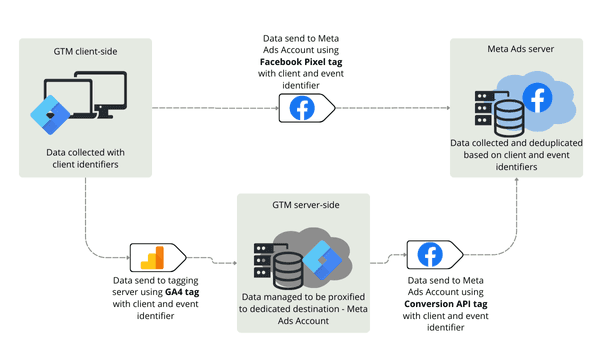
When you implement the Meta Conversions API with server-side GTM, it works on the same principles as server-side GTM itself.
Data is sent to your tagging server with a GA4 tag, and from the tagging server it is passed on to the relevant Meta Ads account using a dedicated Conversions API tag template.
This method assumes that a pixel fires on the client side and sends data to the same Meta Ads account. The pixel creates a client identifier on the client side, stored in the _fbp cookie, which we pass as a parameter in the GA4 tag that sends data to the tagging server. The CAPI tag then passes this value on to Meta, which makes it possible to identify the user.
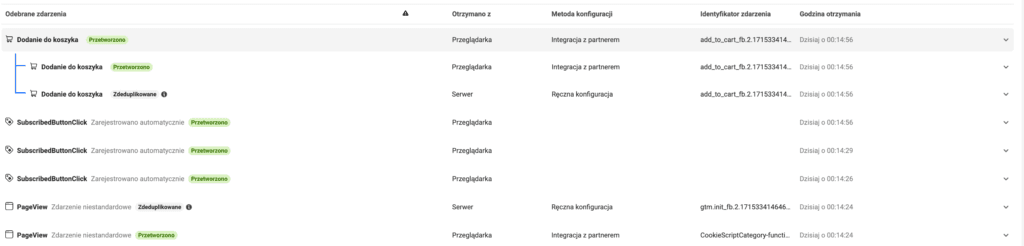
In an optimal setup, every event is sent to Meta both through the Pixel and through the Conversions API. Each should carry an event ID parameter, which Meta uses to deduplicate them.
Why implement the Meta Conversions API?
At this point you might ask: why implement CAPI this way, if it's essentially just a longer route for sending the same data the Pixel collects?
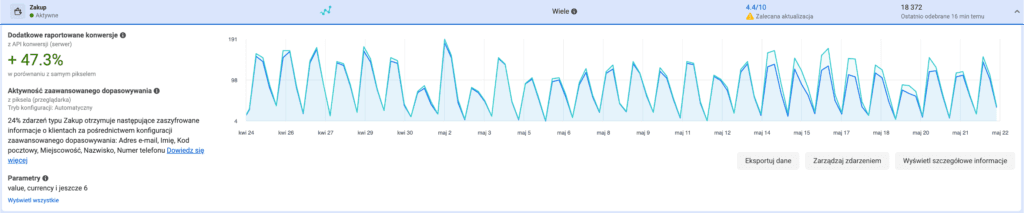
Here's another example to show that it's worth it. It's a fairly extreme case, but the average gain from implementing CAPI is around 20% for the purchase event.
That's because the data collected with the Meta Conversions API isn't ultimately the same data the Pixel collects. You can expect more of it.
A lot depends on how your tagging server is configured, whether you map your own domain to it and whether you implement tracking in first-party mode (an article on first-party mode is on the way 😊).
Data sent to your server can "trick" an unfriendly browser or ad blocker into treating the requests as going to your own server rather than to a 3rd party. As a result, far fewer of these requests get blocked and you collect more data.
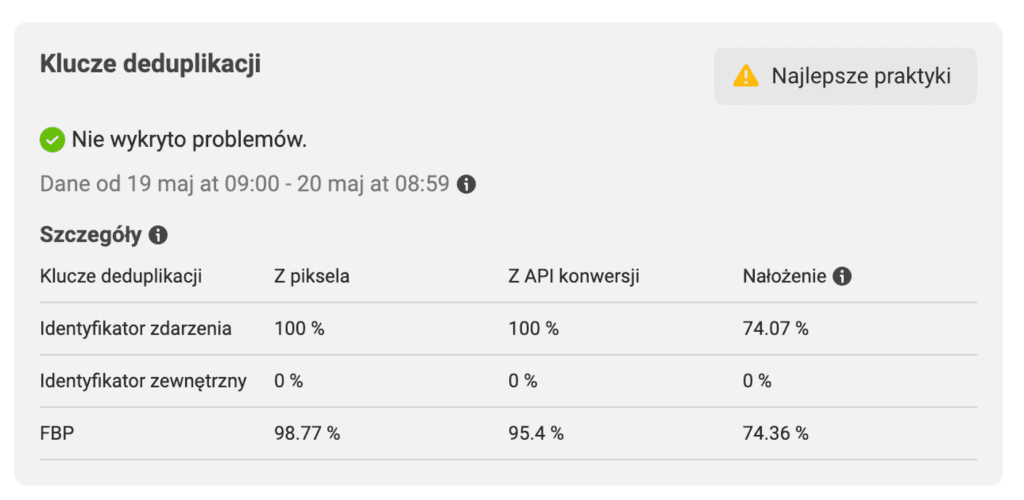
On top of that, the data collected through the Conversions API is of better quality.
During implementation, you can use the much longer-lasting GA cookies and pass them to Meta as an additional user identifier for linking activity to earlier interactions.
You can also set the _fbp cookie in a first-party context from the tagging server, which significantly extends its lifetime.
If you'd like to learn more, join our server-side tracking training, where we go through a complete CAPI implementation in practice: https://bettersteps.pl/en/server-side-gtm-training
And if you'd like to implement the Meta Conversions API on your site but don't feel up to it, get in touch.