Google Analytics 4 currently misattributes traffic and conversions from Display & Video 360 (DV360) and Campaign Manager 360 (CM360) when auto-tagging is enabled. Auto-tagging, which automatically adds parameters to campaign links, is a key part of tracking marketing performance. Google Analytics 4 should automatically attribute the traffic to the correct channel within the Google ecosystem.
Rafał Piszczatowski
Reading time: 6:00
DV360/CM360 traffic attributed to google/cpc in GA4
Unfortunately, at the moment much of the traffic from DV360 or CM360 may end up in google/cpc, the channel used for paid Google Ads campaigns. For companies with a significant share of traffic from DV360 or CM360, this makes it hard to report traffic and its performance correctly in GA4.
With auto-tagging enabled, when a user clicks a DV360 ad and lands on the target page, a ?dclid= parameter is added to the URL. Google Analytics 4 reads this traffic incorrectly and attributes all of it to google/cpc. So the problem lies in recognizing the source with auto-tagging enabled and telling gclid apart from dclid in the URL.
The table below shows how traffic from DV360, for example, may be attributed in GA4 compared with its actual source.
| session source | session medium | session campaign | actual source | actual medium | actual campaign | sessions |
| cpc | christmas_campaign | dv360 | display | christmas_campaign | 1000 |
So the traffic Google Analytics 4 attributes to google/cpc actually comes from DV360.
How to verify the problem and find DV360/CM360 traffic in Google Analytics 4
Google is currently working on a fix, and the DV360 and CM360 attribution problem will probably be solved sooner rather than later. In the meantime, what can you do in GA4 to try to recover this data and track traffic and conversions from these channels?
- Even though the source and medium are passed incorrectly, the campaign name is carried over. It isn't tied to the real traffic source, but if you use a unique campaign name reserved for, say, DV360, you can isolate that data in a report. Based on the table above, if the campaign name “christmas_campaign” was only used for the DV360 campaign, you can rely on it.
- If, in addition to auto-tagging, you add UTM parameters to your links, the UTM values should be stored in GA4. Keep in mind that gclid and dclid take precedence over UTMs, so this doesn't fix the problem automatically. You could turn off auto-tagging, but I haven't tested that route, so I don't recommend it. Back to the setup with auto-tagging enabled plus UTMs on the links. This traffic will be sent to Google Analytics 4, and the utm_source, utm_medium and utm_campaign values will be passed to these dimensions: -Session manual source -Session manual medium -Session manual campaign name
They will of course also show up in the standard Session source and Session medium dimensions, but there the values will be session source=google and session medium=cpc, which unfortunately isn't true.
In GA4, you can build this report in Explorations by selecting the dimensions listed above.
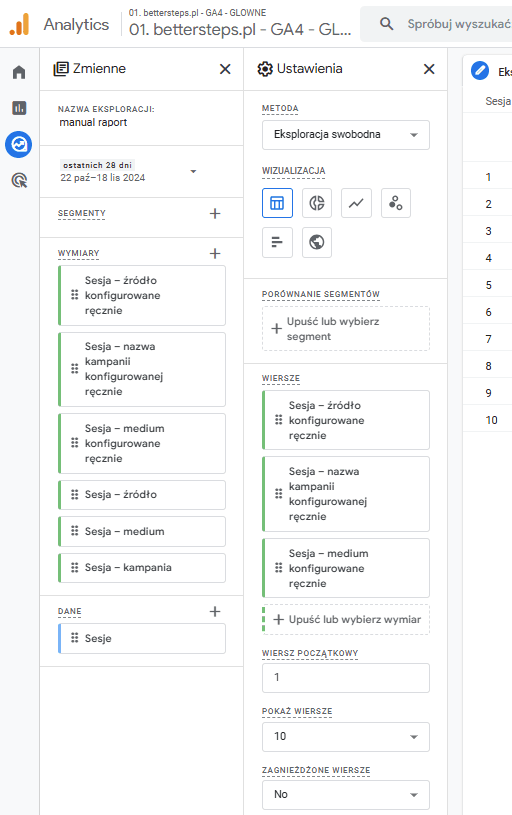
For example, you might get the results shown in the table below. It shows that by default GA4 attributes the traffic to google/cpc, while it actually came from DV360, for instance.
| session source | session medium | session campaign | Session manual source | Session manual medium | Session manual campaign name | sessions |
| cpc | christmas_campaign | dv360 | display | christmas_campaign | 1000 |
A report like this lets you check right away whether DV360/CM360 sources are being misattributed. When you verify it, remember that it only works if your campaigns use double link tagging: auto-tagging plus manually added UTMs.
Ad clicks vs. sessions in GA4
DV360 and CM360 themselves collect data correctly, but the clicks, impressions and other metrics you see there don't map directly to what GA4 collects. So why can the number of sessions for a given campaign or manual source differ so much from the number of clicks? There are several reasons:
- A click is recorded when a user clicks an ad element tracked by CM360 (e.g., a banner or CTA button), while a session starts when the user visits the website.
- On a GDPR-compliant website, a new user's session is only sent after they accept cookies.
- Every click counts: CM360 counts every click, whether or not the user actually reached the landing page (e.g., because of network errors or closing the window before the page loaded).
- One session per user within a short time: if a user clicks an ad and visits the landing page several times in a short period, GA4 counts it as one session, unless the session is deliberately ended (e.g., by closing the browser for more than 30 minutes).
To show how these differences add up in practice, imagine an ad campaign with 1,000 clicks. 100 of them were double or accidental clicks, which leaves 900 visits to the site. When these users land on the site, they see a banner asking for marketing consent (for new cookies, and campaigns very often target new users). The cookie acceptance rate among new users from a paid campaign can be much lower than the average for organic traffic, for example 50%. Another 15% are lost to ad blockers or non-standard browsers that don't load Google scripts.
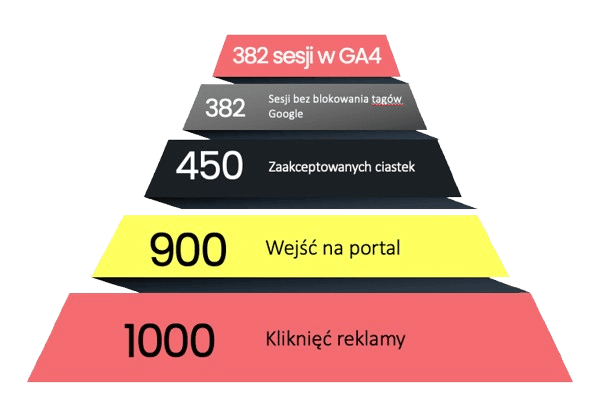
That means the DV360 report shows 1,000 ad clicks, while GA4 records 382 sessions. This is a very plausible scenario, and of course it doesn't only apply to DV360 and CM360, but also to other tools and paid campaigns, such as Facebook or LinkedIn. Several factors affect how many sessions get recorded, and the figure can vary a lot by source and ad type. Recorded sessions can cover anywhere from 15% to 80% of ad clicks. What matters is being sure that whenever a session is recorded, everything is stored correctly, or that you can get this data through custom solutions, since you know about the current issues.
| Aspect | Campaign Manager 360 | Google Analytics 4 |
| Main metric | Ad clicks | Sessions started on the landing page |
| Technical requirements | Landing page doesn't need to load | Landing page must load |
| Duplicates | Counts every click, even repeated ones | Counts one session start per user within a short time |
| Consent mode | No impact | Has an impact |
Summary
The DV360 and CM360 attribution problem can be a real challenge for companies that rely heavily on these channels. First, the results of these channels won't be attributed to the right source in GA4. Second, you'll get a distorted, inflated picture of paid traffic from Google Ads (google/cpc).
The issue will probably be fixed in Q4 2024 or Q1 2025, but if you're running DV360/CM360 campaigns now, it's worth correcting your GA4 results and checking how this traffic is attributed in your GA4 property.