In the standard reports in Google Analytics 4, you can look at your data from the perspective of three types of attribution:
Data-driven attribution - instead of fixed rules, it uses machine learning to analyze both the paths that ended in a conversion and the ones that didn't.
Rafał Piszczatowski
Reading time: 8:00
Attribution in Google Analytics 4: close the gaps in your traffic source tracking
- How it works: The algorithm estimates how much each click on the path influenced the final decision. If a user clicked a YouTube ad, then a newsletter link, and finally came in from a search engine, DDA assigns a fraction of the conversion to each of these touchpoints (e.g. 0.2 to YT, 0.3 to email, 0.5 to organic).
- The problem: For an analyst it's a "black box". We can't see exactly why Google gave 20% of the credit to a display ad. In day-to-day operations (e.g. settling affiliate commissions) we need a binary answer to "Who brought the customer in at the moment of purchase?", not "Who reminded them about us a week ago?".
Last click model - this approach is the closest to what we remember from Universal Analytics and what we usually see in the Traffic acquisition report. The key rule here is the "Last Non-Direct Click" mechanism.
- How it works: If a user lands on the site from a Google Ads campaign (cpc) and later comes back by typing the address directly into the browser (direct), GA4 ignores the direct visit and attributes the session to the last known source (Google Ads).
- The problem: It sounds logical, but in GA4 this mechanism can fail with certain redirects, e.g. when a user returns during an open session through a new link with UTM parameters. In Universal, this started a new session with a new source. In most cases GA4, Universal's successor, handles this better, but there are specific situations where we actually want that new source to be passed on.
First user source - this dimension looks back in time, as far as the cookie lifetime (or the User-ID) allows. It answers the question: "How did this person first find out about us?".
- How it works: It doesn't matter that the user has just come in from the newsletter and made a purchase. If they first landed on the site from a Facebook ad three months ago, the User acquisition report attributes the conversion to Facebook.
- The problem: This model is great for marketing directors evaluating their growth strategy, but terrible for e-commerce managers who need to know which campaign "closed" the cart this morning. It ignores the whole persuasion path that came after the first contact.
Why might you need a new way of measuring data?
1. Filling in missing channel paths, e.g. for affiliate campaigns. The main advantage of this solution is how it handles the moment a user leaves the site, for example to look for a discount code. In these scenarios GA4 will most likely not overwrite the existing source (e.g. Google Ads) with the new one, whereas the script restores data from a cookie. When the user comes back through an affiliate link, we can attribute the purchase to that source. GA4 is right not to overwrite the source automatically, because it would be unfair if any action on the site could override whoever actually brought the user to it. Still, you may need to collect this information, and in that case the script works perfectly.
2. Verifying and comparing GA4 data. You don't have to blindly trust the data the tool gives you. When Google Analytics 4 models conversions (e.g. when full cookie consent is missing) or assigns credit to channels in an unclear way, your own script gives you the reference point you need. It works on binary logic and treats a UTM parameter in the URL as indisputable proof of the visit's source. As a result, the analyst has a set of raw comparison data to check whether Google's algorithms are distorting the real picture of campaign performance in a given case.
3. CRM integration. Because the traffic source is saved directly in the browser's sessionStorage, you can send analytics data outside the Google ecosystem, straight into your sales systems. Developers can easily read this information and put it into hidden fields in contact forms, so a salesperson in the CRM (such as HubSpot or Salesforce) immediately sees the exact lead source (e.g. a specific LinkedIn campaign) without waiting for delayed analytics reports to process the data.
How does the script that passes on the traffic source work?
The script is a listener that runs on every page load. It was written by Lunametrics (now part of Bounteous) and improved by Julius Fedorovicius of Analytics Mania. I edited the script so that it also passes 3 parameters, traffic_source, traffic_medium and traffic_campaign, to session_storage.
<script>
/**
* Traffic Source Tracker for bettersteps.pl
* Based on Lunametrics & Analytics Mania logic
* Features: Cookie storage (First Click model) + sessionStorage support
*/
(function(document) {

  var cookieName = 'initialTrafficSource';
  var sessionCookieName = '__utmzzses';
  var cookieExpiration = new Date(+new Date() + 1000 * 60 * 60 * 24 * 30 * 24);

  var referrer = document.referrer;
  var gaReferral = {
    'utmcsr': '(direct)',
    'utmcmd': '(none)',
    'utmccn': '(not set)'
  };

  var thisHostname = document.location.hostname;
  var thisDomain = getDomain_(thisHostname);
  var referringDomain = getDomain_(document.referrer);

  var sessionCookie = getCookie_(sessionCookieName);
  var qs = document.location.search.replace('?', '');
  var hash = document.location.hash.replace('#', '');
  var gaParams = parseGoogleParams(qs + '#' + hash);
  var referringInfo = parseGaReferrer(referrer);
  var storedVals = getCookie_(cookieName) || getCookie_('__utmz') || getCookie_('__utmzz');
  var newCookieVals = [];

  var keyMap = {
    'utm_source': 'utmcsr',
    'utm_medium': 'utmcmd',
    'utm_campaign': 'utmccn',
    'utm_content': 'utmcct',
    'utm_term': 'utmctr',
    'gclid': 'utmgclid',
    'dclid': 'utmdclid'
  };

  var keyFilter = ['utmcsr', 'utmcmd', 'utmccn', 'utmcct', 'utmctr'];
  var key, i, len, _val, _key, raw, keyName, values;

  if (sessionCookie && referringDomain === thisDomain) {
    gaParams = null;
    referringInfo = null;
  }

  if (gaParams && (gaParams.utm_source || gaParams.gclid || gaParams.dclid)) {
    for (key in gaParams) {
      if (typeof gaParams[key] !== 'undefined') {
        keyName = keyMap[key];
        gaReferral[keyName] = gaParams[key];
      }
    }
    if (gaParams.gclid || gaParams.dclid) {
      gaReferral.utmcsr = 'google';
      gaReferral.utmcmd = gaReferral.utmgclid ? 'cpc' : 'cpm';
    }
  }
  else if (referringInfo) {
    gaReferral.utmcsr = referringInfo.source;
    gaReferral.utmcmd = referringInfo.medium;
    if (referringInfo.term) gaReferral.utmctr = referringInfo.term;
  }
  else if (storedVals) {
    values = {};
    raw = storedVals.split('|');
    len = raw.length;
    for (i = 0; i < len; i++) {
      _val = raw[i].split('=');
      _key = _val[0].split('.').pop();
      values[_key] = _val[1];
    }
    gaReferral = values;
  }

  for (key in gaReferral) {
    if (typeof gaReferral[key] !== 'undefined' && keyFilter.indexOf(key) > -1) {
      newCookieVals.push(key + '=' + gaReferral[key]);
    }
  }

  writeCookie_(cookieName, newCookieVals.join('|'), cookieExpiration, '/', thisDomain);

  writeCookie_(sessionCookieName, 1, null, '/', thisDomain);

  try {
      var s_source = gaReferral.utmcsr || '(direct)';
      var s_medium = gaReferral.utmcmd || '(none)';
      var s_campaign = gaReferral.utmccn || '(not set)';

      sessionStorage.setItem('traffic_source', s_source);
      sessionStorage.setItem('traffic_medium', s_medium);
      sessionStorage.setItem('traffic_campaign', s_campaign);
  } catch (e) {
  }


  function parseGoogleParams(str) {
    var campaignParams = ['source', 'medium', 'campaign', 'term', 'content'];
    var regex = new RegExp('(utm_(' + campaignParams.join('|') + ')|(d|g)clid)=.*?([^&#]*|$)', 'gi');
    var gaParams = str.match(regex);
    var paramsObj, vals, len, i;
    if (gaParams) {
      paramsObj = {};
      len = gaParams.length;
      for (i = 0; i < len; i++) {
        vals = gaParams[i].split('=');
        if (vals) {
          paramsObj[vals[0]] = vals[1];
        }
      }
    }
    return paramsObj;
  }

  function parseGaReferrer(referrer) {
    if (!referrer) return;
    var searchEngines = {
      'daum.net': {'p': 'q','n': 'daum'},
      'eniro.se': {'p': 'search_word','n': 'eniro '},
      'naver.com': {'p': 'query','n': 'naver '},
      'yahoo.com': {'p': 'p','n': 'yahoo'},
      'msn.com': {'p': 'q','n': 'msn'},
      'bing.com': {'p': 'q','n': 'live'},
      'aol.com': {'p': 'q','n': 'aol'},
      'lycos.com': {'p': 'q','n': 'lycos'},
      'ask.com': {'p': 'q','n': 'ask'},
      'altavista.com': {'p': 'q','n': 'altavista'},
      'search.netscape.com': {'p': 'query','n': 'netscape'},
      'cnn.com': {'p': 'query','n': 'cnn'},
      'about.com': {'p': 'terms','n': 'about'},
      'mamma.com': {'p': 'query','n': 'mama'},
      'alltheweb.com': {'p': 'q','n': 'alltheweb'},
      'voila.fr': {'p': 'rdata','n': 'voila'},
      'search.virgilio.it': {'p': 'qs','n': 'virgilio'},
      'baidu.com': {'p': 'wd','n': 'baidu'},
      'alice.com': {'p': 'qs','n': 'alice'},
      'yandex.com': {'p': 'text','n': 'yandex'},
      'najdi.org.mk': {'p': 'q','n': 'najdi'},
      'seznam.cz': {'p': 'q','n': 'seznam'},
      'search.com': {'p': 'q','n': 'search'},
      'wp.pl': {'p': 'szukaj ','n': 'wirtulana polska'},
      'online.onetcenter.org': {'p': 'qt','n': 'o*net'},
      'szukacz.pl': {'p': 'q','n': 'szukacz'},
      'yam.com': {'p': 'k','n': 'yam'},
      'pchome.com': {'p': 'q','n': 'pchome'},
      'kvasir.no': {'p': 'q','n': 'kvasir'},
      'sesam.no': {'p': 'q','n': 'sesam'},
      'ozu.es': {'p': 'q','n': 'ozu '},
      'terra.com': {'p': 'query','n': 'terra'},
      'mynet.com': {'p': 'q','n': 'mynet'},
      'ekolay.net': {'p': 'q','n': 'ekolay'},
      'rambler.ru': {'p': 'words','n': 'rambler'},
      'google': {'p': 'q','n': 'google'}
    };
    var a = document.createElement('a');
    var values = {};
    var searchEngine, termRegex, term;

    a.href = referrer;

    if (a.hostname.indexOf('google') > -1) {
      referringDomain = 'google';
    }

    if (searchEngines[referringDomain]) {
      searchEngine = searchEngines[referringDomain];
      termRegex = new RegExp(searchEngine.p + '=.*?([^&#]*|$)', 'gi');
      term = a.search.match(termRegex);
      values.source = searchEngine.n;
      values.medium = 'organic';
      values.term = (term ? term[0].split('=')[1] : '') || '(not provided)';
    } else if (referringDomain !== thisDomain) {
      values.source = a.hostname;
      values.medium = 'referral';
    }
    return values;
  }

  function writeCookie_(name, value, expiration, path, domain) {
    var str = name + '=' + value + ';';
    if (expiration) str += 'Expires=' + expiration.toGMTString() + ';';
    if (path) str += 'Path=' + path + ';';
    if (domain) str += 'Domain=' + domain + ';';
    document.cookie = str;
  }

  function getCookie_(name) {
    var cookies = '; ' + document.cookie;
    var cvals = cookies.split('; ' + name + '=');
    if (cvals.length > 1) return cvals.pop().split(';')[0];
  }

  function getDomain_(url) {
    if (!url) return;
    var a = document.createElement('a');
    a.href = url;
    try {
      return a.hostname.match(/[^.]*\.[^.]{2,3}(?:\.[^.]{2,3})?$/)[0];
    } catch (squelch) {
      return a.hostname;
    }
  }

})(document);
</script>
The script's most important job is to create a cookie called “initialTrafficSource”, which holds information about the traffic source. We can use this information and send it to various tools. In this article, of course, we focus on sending it to Google Analytics.
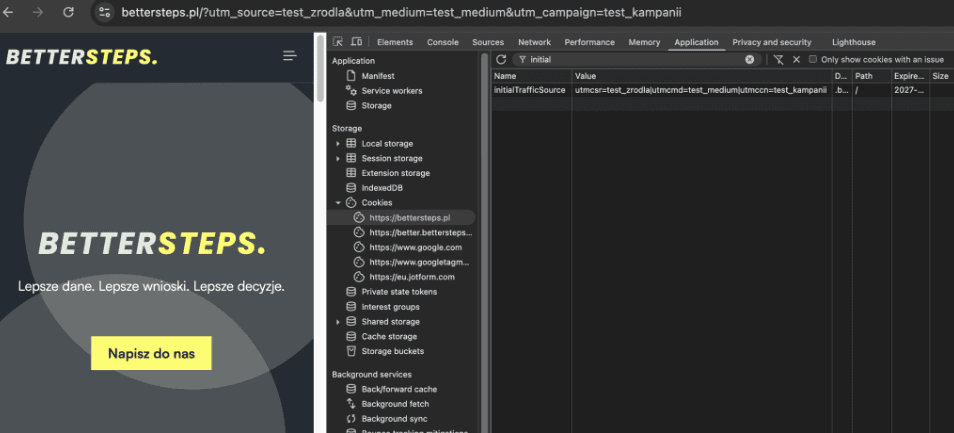
When passing on the source, the logic is as follows:
Step A: Filtering internal traffic The script checks: Does the user have an active session cookie, and did they come from our own domain? If YES, the script "goes to sleep". It does nothing, so that internal navigation between pages doesn't overwrite, for example, a visit from Google Ads.
Step B: URL parameters
The script checks the URL.
- If it finds utm_source, gclid (Google Ads) or dclid, it always overwrites the existing source with the new data.
- This guarantees that if someone clicks an affiliate link or a new ad, it's recorded immediately.
Step C: Referrer If there are no parameters in the URL, the script looks at document.referrer (the page the user came from).
- The script has a built-in list of search engines (the parseGaReferrer function). If it recognizes google.com, bing.com etc., it assigns the organic medium.
- If it's another site (e.g. Facebook or a blog), it assigns referral.
Step D: Cookie restore If there are no UTMs and no external referrer (meaning the visit is direct or a page refresh), the script checks the initialTrafficSource cookie.
- If it finds previously saved data there, it restores it. This way a direct visit doesn't "overwrite" an earlier marketing campaign with empty data (direct/none).
At the very end, once the "winning" source is determined, the script saves it in 2 cookies and in sessionStorage: the main cookie (initialTrafficSource) and sessionStorage (it saves traffic_source, traffic_medium and traffic_campaign in the browser's storage).
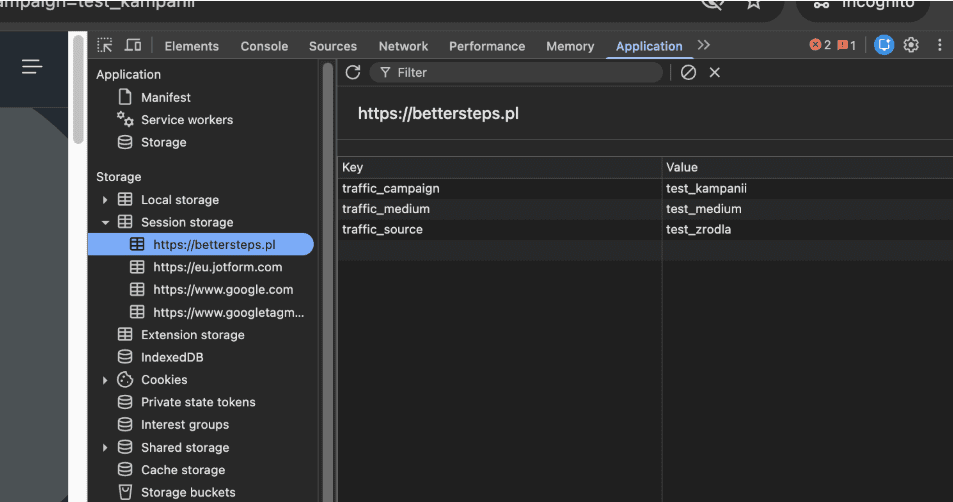
Sending the data to Google Analytics 4
To send this data to GA4, you can use the values prepared in sessionStorage. Taking the traffic_source variable as an example, create a Custom JavaScript variable with this function:
function() {
    return sessionStorage.getItem('traffic_source');
}
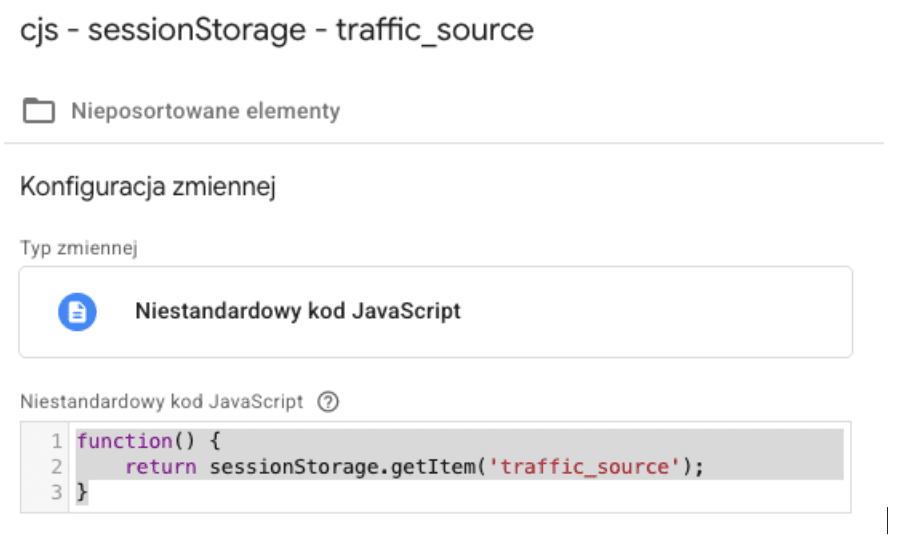
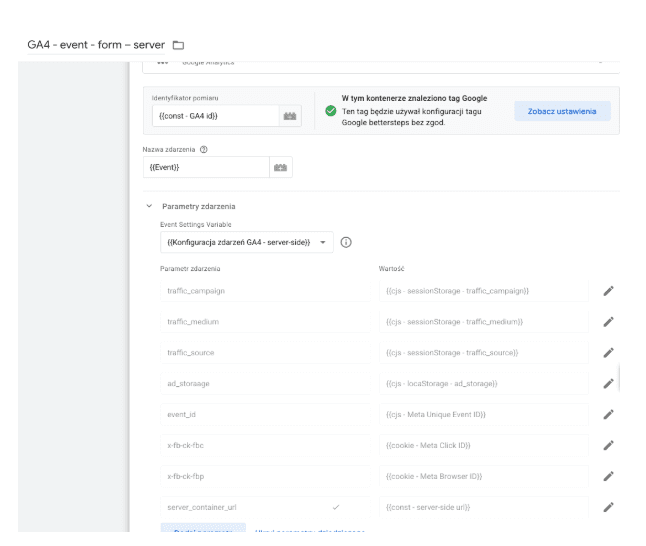
Do the same for traffic_medium and traffic_campaign. My next step was to use an Event Settings variable, which I use to pass constant parameters to all events sent to Google Analytics 4.
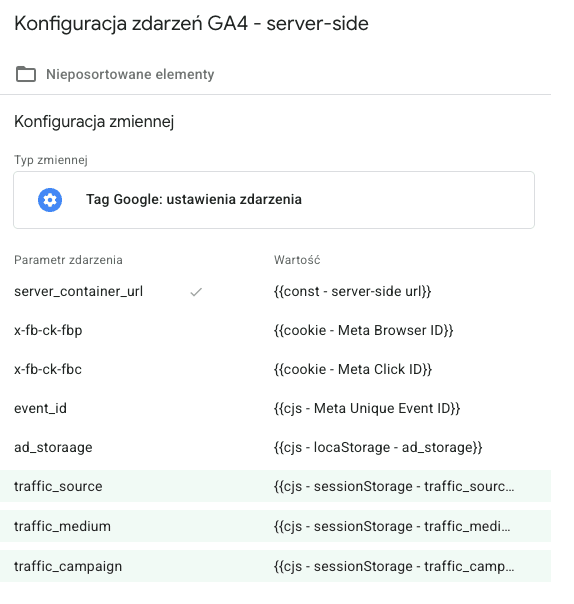
After editing the event settings, the parameters were automatically added to all my Google Analytics 4 tags. If you don't use event settings, you can manually add the traffic_campaign, traffic_medium and traffic_source parameters to the event you want them sent with, e.g. purchase or page_view.
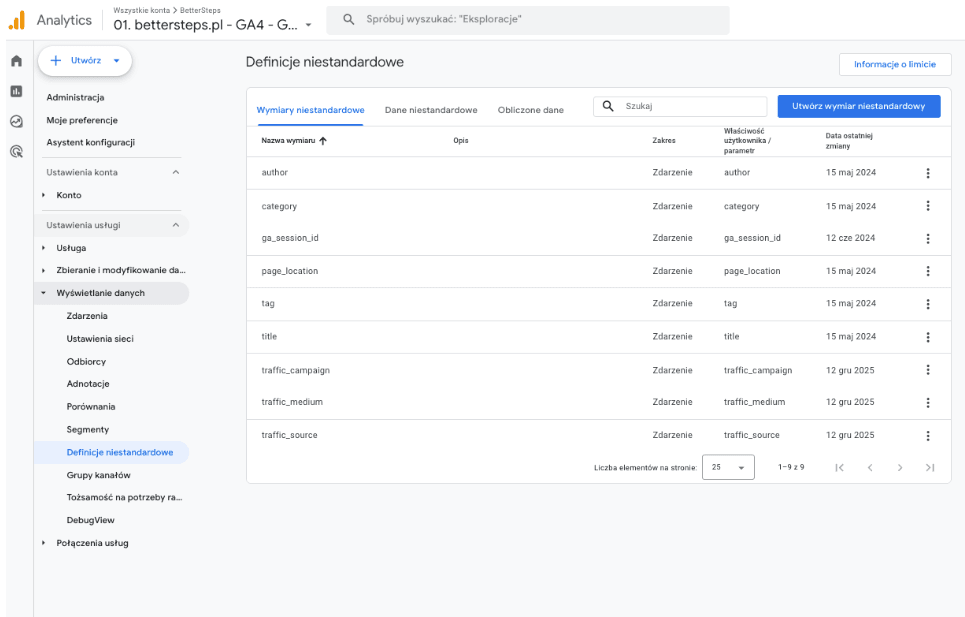
The last implementation step is to register the variables sent by GTM (traffic_source, traffic_medium and traffic_campaign) in Google Analytics 4 so the tool actually picks them up.
Data analysis: GA4 data vs. data from the script
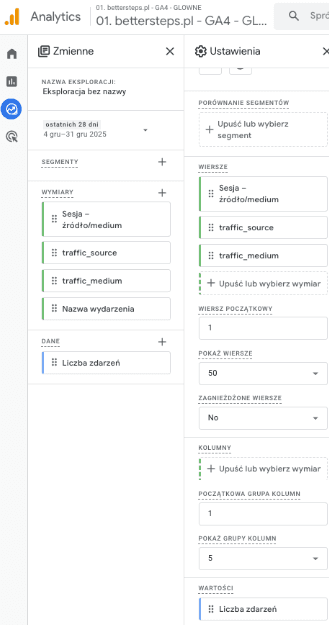
Once the solution is live, I recommend building an exploration report where you can analyze the event you're interested in (remember to send our additional variables with that event) by the traffic source according to Google's attribution and according to the script described in this article. If you have a long data history in GA4, keep in mind that Google Analytics remembers the last non-direct session. Imagine I came to the site through Google Ads a month ago. Yesterday I came back by typing the address directly into the browser. This means the source in GA4 will be Google Ads, while according to our script it will be direct/not set.
Summary
GA4 "models" more and more, so an independent verification system works as an insurance policy for your data. In some cases, such as affiliate campaigns (discounts from UTM-tagged links during an already open session), it can also fill in the customer journey.
Remember, this solution isn't meant to replace GA4, only to complement it. It gives you a second pair of eyes that looks at traffic exactly the way you defined it in the code.Implement the script in a GTM test environment, turn on Preview mode and run a test. Click your UTM link, add a product, come back through a different UTM link, and check in the browser console, following the screenshots in this article, whether the traffic_source values switched immediately. If they did, you're ready to go to production.